

 Veselin Stoyanov12 min read
How to Set Up Webhook Automation for SEO Content Delivery
Learn how to use webhook automation to deliver SEO content from your generator to a custom CMS, review system, or publishing workflow.

Webhooks are one of the simplest ways to connect an SEO content system to the rest of your publishing stack. Instead of repeatedly checking whether a new article is ready, your system can receive an event and act on it immediately.
For website owners, this creates a more reliable automated content workflow. Content can move from planning and generation to review, transformation, and publishing without requiring someone to download files or copy content between applications.
This guide explains how to set up webhook automation for SEO content delivery, including endpoint design, request verification, payload mapping, retries, error handling, and publishing safeguards.
What is webhook automation?
Webhook automation is an event-driven connection between two systems. When an event occurs in one system, it sends an HTTP request to a URL controlled by another system. The receiving application then processes the request and performs an action.
For SEO content, the event might be a newly generated article. The receiving system could be:
- A custom CMS
- A headless content backend
- An editorial review queue
- A workflow automation platform
- A database or content staging service
The key difference between webhooks and polling is who initiates the communication. With polling, your application repeatedly asks whether new content exists. With a webhook, the content system sends a request when the content is ready.
That makes webhook automation useful for publishing workflows where speed, simplicity, and fewer unnecessary requests matter.
How an SEO content webhook workflow works
A typical workflow has five stages:
- An article is planned around a target keyword.
- The content system generates the article and associated metadata.
- A webhook sends the completed payload to your endpoint.
- Your backend verifies, validates, and transforms the payload.
- Your CMS stores the article as a draft, schedules it, or publishes it.
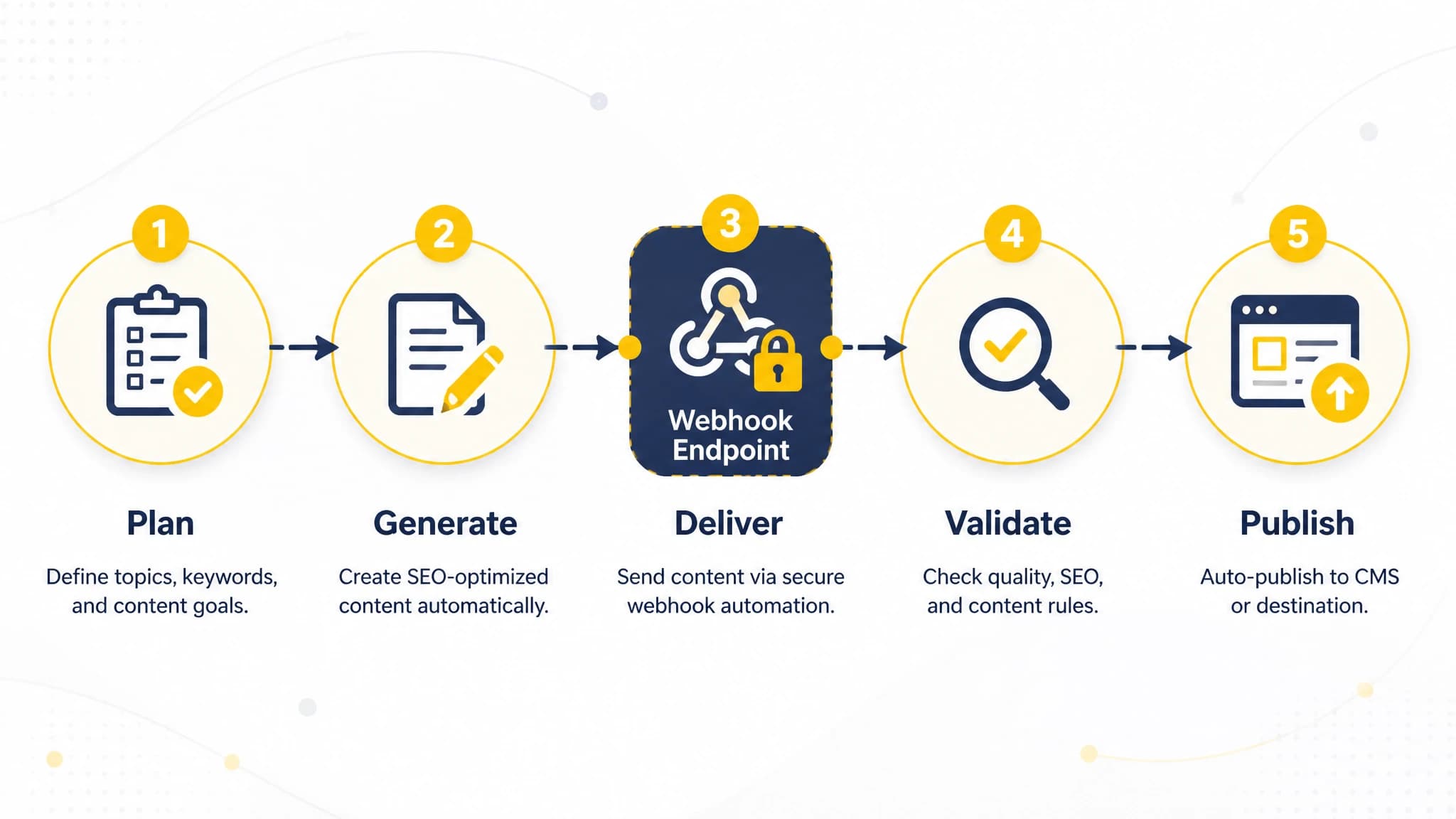
A reliable workflow separates content generation, delivery, validation, and publication.
The webhook should not be responsible for every business decision. Its job is to deliver the event reliably. Your application should decide whether the article needs editorial review, which author to assign, what content type to use, and when the page should become public.
This separation keeps the integration flexible. You can change your CMS rules without changing the content generation system.
Step 1: Define the publishing event
Before creating an endpoint, decide exactly what event should trigger delivery. Common options include:
- Article generation completed
- Article approved for publication
- Article updated
- Metadata changed
- Image processing completed
For a first implementation, use one clear event: an article is ready for delivery. Avoid combining several unrelated states until your system can distinguish them reliably.
You should also define what happens after delivery. For example, your endpoint may always create a draft, while an editor or separate workflow promotes the article to published status.
A clear event model prevents accidental publication. It also makes troubleshooting easier because each incoming request has a predictable meaning.
Step 2: Create an HTTPS endpoint
Your receiving endpoint should use HTTPS and accept POST requests. A simple endpoint might look like this:
POST https://cms.example.com/api/content/webhook
The endpoint should be publicly reachable by the sending system, but that does not mean it should be open to unauthenticated content. Protect it with signature verification, request validation, rate limiting, and sensible server-side logging.
At minimum, the endpoint should:
- Accept the expected HTTP method
- Read the raw request body
- Read the signature and timestamp headers
- Verify the request before parsing or storing content
- Return a clear success or failure response
- Log an internal delivery identifier
Do not rely on an obscure URL as your only security measure. A URL can leak through logs, configuration files, or error messages.
Step 3: Verify webhook signatures
Signature verification confirms that a request came from the expected sender and was not changed in transit. A common approach uses HMAC-SHA256.
The sender and receiver share a secret. The sender calculates a signature from the request timestamp and raw body. Your endpoint calculates the signature again and compares the values using a constant-time comparison.
A conceptual signing string might be:
timestamp + "." + raw_request_body
The exact signing format depends on the webhook provider, so follow the provider's instructions rather than assuming a format.
Important implementation rules include:
- Store the signing secret in server-side environment variables or a secret manager.
- Verify the raw request body before JSON parsing changes its representation.
- Reject requests with missing or malformed signature headers.
- Reject timestamps outside your accepted replay window.
- Compare signatures using a constant-time method.
- Never log the secret or complete sensitive headers.
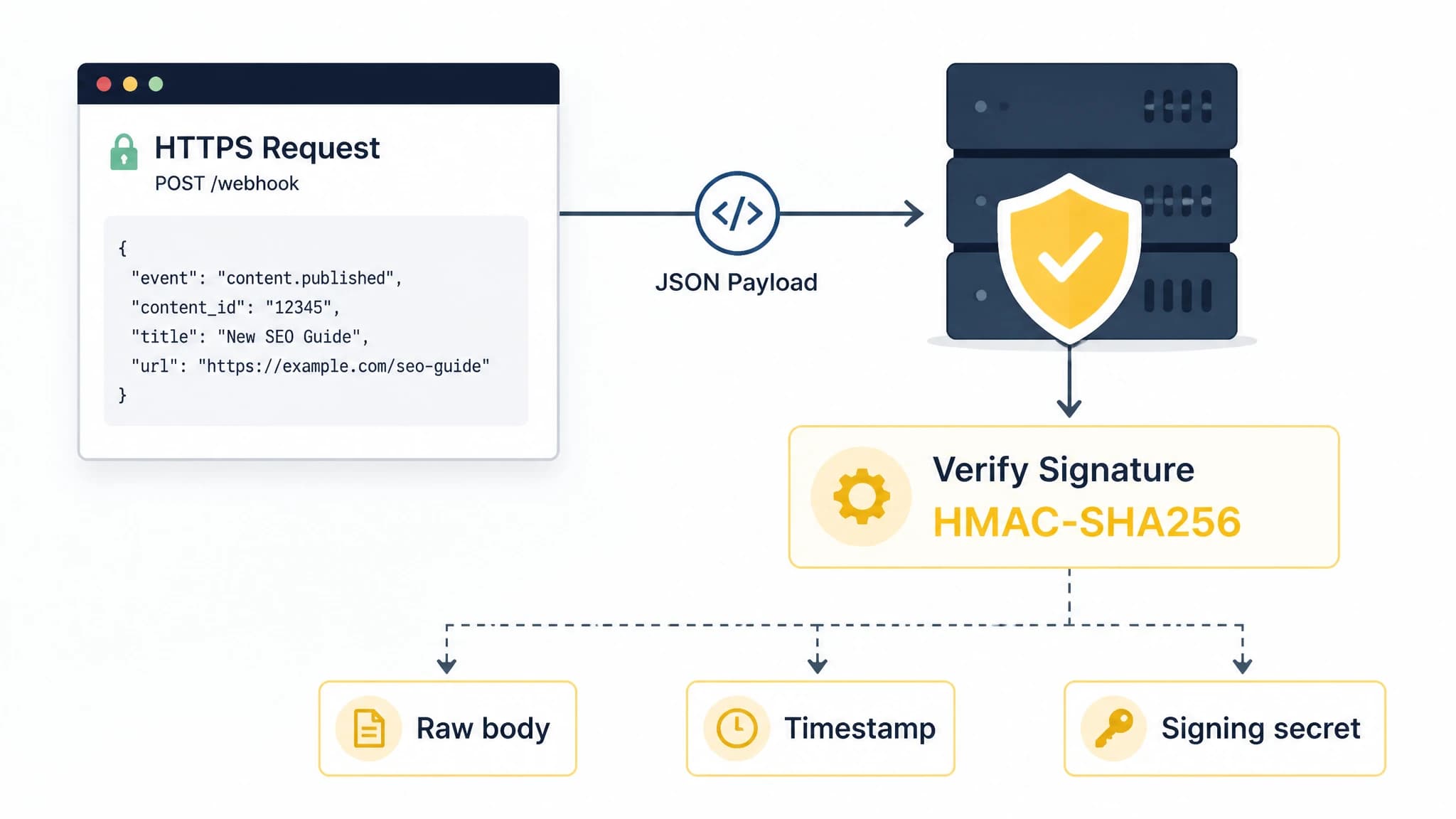
Verify the sender and the untouched request body before processing content.
Signature verification is not the same as authorization. After verifying the sender, validate that the article is allowed to enter the intended site, project, or content collection.
Step 4: Understand and validate the payload
A useful SEO content payload usually contains more than the article body. It may include fields such as:
- Title
- Slug
- Publication or generation dates
- Meta description
- Excerpt
- Primary and secondary keywords
- Tags
- Cover image
- Inline images
- HTML body
- Markdown body
- Generation timestamps
RankWorker's webhook integration is designed to send generated articles to a custom backend or automation workflow. Its documented payload includes article content, metadata, keywords, tags, cover imagery, and inline visuals in HTML and Markdown formats.
Your endpoint should validate the fields it needs before writing anything to the CMS. For example:
if title is missing:
    return 400

if slug is missing:
    return 400

if html_body is missing and markdown_body is missing:
    return 400

if payload.site_id is not allowed:
    return 403

create_or_update_draft(payload)
return 200
Validation should cover both structure and business rules. A request can contain valid JSON and still be unusable because the slug is duplicated, the destination site is incorrect, or the content status is not permitted.
Step 5: Map the payload into your CMS
Most custom CMS platforms use a content model that differs from the source payload. Create an explicit mapping layer instead of passing fields through blindly.
For example:
| Webhook field | CMS field | Handling |
|---|---|---|
title | headline | Store as the visible article title |
slug | path | Normalize and check uniqueness |
description | metaDescription | Use for search metadata |
excerpt | summary | Use for cards and previews |
htmlBody | body | Store when the CMS renders HTML |
markdownBody | bodyMarkdown | Store when Markdown is preferred |
tags | categories | Map to existing taxonomy terms |
coverImage | heroImage | Download or store the referenced asset |
Do not assume that every system should store both HTML and Markdown as the public body. Choose one canonical representation and keep the other only if it supports editing, portability, or future migrations.
Images need their own handling rules. Decide whether your CMS should retain remote image references, download files into local storage, or send them through an image service. The correct choice depends on your infrastructure and content model.
Step 6: Make the endpoint idempotent
Webhook providers may retry a request when your endpoint times out or returns an error. Your endpoint must be safe to receive the same event more than once.
This is called idempotency. Instead of creating duplicate articles, the receiver recognizes that an event has already been processed and returns a successful response without repeating the side effect.
Useful idempotency keys include:
- A provider-supplied event ID
- A stable article ID
- A combination of project ID and article ID
- A content version identifier
Store the key with the processing result. When the same key arrives again, check the stored result before creating a new draft.
A basic flow looks like this:
if event_id already processed:
    return 200

validate_request()
create_or_update_content()
record event_id as processed
return 200
Be careful with the order of operations. If the server creates the article but crashes before recording the event ID, a retry may still occur. Database transactions, unique constraints, or an upsert operation can help protect against this failure mode.
Step 7: Handle retries and response codes
Reliable webhook automation requires clear response behavior. In general, return a success response only after the request has been accepted and safely recorded for processing.
Use response codes consistently:
2xxwhen the event was accepted or already processed4xxwhen the request is invalid, unauthorized, or cannot be corrected by retrying5xxwhen a temporary server or infrastructure problem occurred
If your CMS is slow, consider accepting the webhook quickly and placing the event on an internal queue. A background worker can then download images, transform content, and create the CMS record.
This approach reduces timeout risk and makes it easier to retry individual processing steps. It also prevents a temporary image service or database delay from making the entire webhook delivery appear unsuccessful.
Step 8: Add review and publishing safeguards
Automation should reduce repetitive work without removing important editorial controls. A practical SEO workflow often sends every new article to a draft or review state first.
Useful safeguards include:
- Require a valid title, slug, and meta description.
- Block publication when required images are unavailable.
- Check for duplicate slugs.
- Confirm the target website or content collection.
- Preserve the source article ID for traceability.
- Record who or what approved publication.
- Prevent a content update from overwriting manual edits without a policy.
For some sites, fully automatic publishing is appropriate. For others, the webhook should only create a draft and notify an editor. Choose the least risky publishing state that still saves meaningful time.
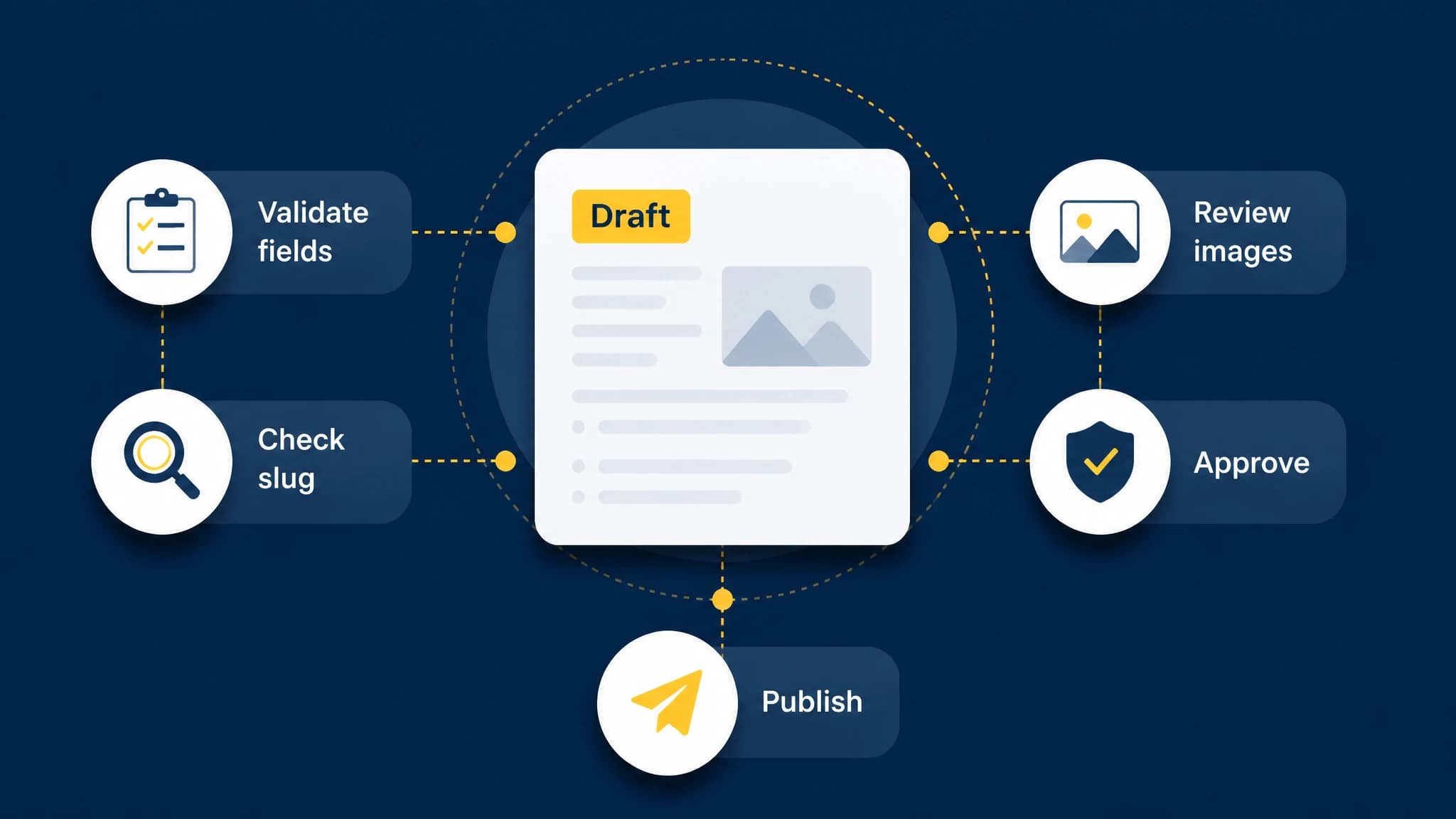
Draft-first controls help prevent invalid or unintended content from going live.
Step 9: Monitor the workflow
A webhook integration is not complete when the first article arrives. You also need visibility into delivery and processing.
Track at least:
- Received timestamp
- Event or article identifier
- Verification result
- Response status
- Processing duration
- CMS record ID
- Retry count
- Failure reason
Use structured logs so you can search by event ID or article ID. Avoid logging full article bodies unless you have a clear privacy and retention policy. Payloads can be large and may contain unpublished business information.
Create alerts for repeated failures, signature mismatches, increasing processing times, and content records stuck in a pending state. A small amount of monitoring can prevent a silent publishing gap.
Using RankWorker for webhook-based content delivery
RankWorker can fit into an automated content workflow when your publishing destination is a custom CMS, backend, or automation platform. Its Webhooks integration provides an HTTPS delivery path for generated articles, supports signed requests, and includes retry behavior for failed or timed-out deliveries according to the integration documentation.
The integration can also connect with workflow tools such as n8n, Make, and Zapier. This lets you place review, transformation, routing, or notification steps between article generation and final publication.
The important architectural decision remains yours: determine how your system verifies requests, maps content, handles duplicates, and controls publication.
A practical implementation checklist
Before going live, confirm that you can answer yes to each question:
- Is the endpoint protected with HTTPS?
- Is the raw request body used for signature verification?
- Is the signing secret stored securely?
- Are replayed or duplicate events handled safely?
- Are required fields validated before storage?
- Is the target website or content collection checked?
- Are HTML, Markdown, metadata, and images mapped intentionally?
- Does the endpoint return appropriate response codes?
- Are slow operations handled asynchronously where needed?
- Can you trace an article from delivery to CMS publication?
- Is there a review state or rollback process?
- Are failures and repeated retries monitored?
If these controls are in place, webhook automation can become a dependable part of your SEO workflow rather than another fragile connection to maintain.
Conclusion
Webhook automation gives SEO teams a practical way to connect content generation with custom publishing systems. Instead of polling for new articles or moving content manually, your backend can respond to an event, verify the request, validate the payload, and route the content through the right editorial and publishing steps.
The most important principles are straightforward: secure every request, make processing idempotent, validate before publishing, separate delivery from business logic, and monitor failures. With those foundations, an automated content workflow can remain flexible as your CMS, review process, and SEO program evolve.