

 Veselin Stoyanov14 min read
How to Automate Article Image Generation for SEO Blogs
Learn how to automate article image generation for SEO blogs, choose relevant visuals, and build a faster content workflow with consistent quality.

How to Automate Article Image Generation for SEO Blogs
Publishing SEO content involves more than producing a well-written article. Every post also needs visuals that clarify the topic, support the reader's journey, and make the page feel complete.
The problem is that finding or creating those images can take almost as much time as drafting the article. Writers search stock libraries, compare licenses, resize files, rename assets, write alt text, and upload everything to the CMS. When this process is repeated across dozens of posts, images become a bottleneck in an otherwise efficient content operation.
Automating article image generation solves that bottleneck. A well-designed workflow can turn an article brief into a complete visual package: a cover image, relevant inline graphics, descriptive metadata, and publication-ready assets. The key is to automate the repetitive production work while keeping human judgment over relevance, quality, and brand fit.
Why article images matter for SEO blogs
Images do not guarantee higher rankings by themselves. However, useful visuals can improve the overall quality and usability of a page, which supports the goals of a strong SEO content strategy.
Relevant images can help in several ways:
- Make long articles easier to scan: Visual breaks give readers a natural pause between sections.
- Explain complex ideas: Diagrams, workflows, and annotated illustrations can communicate relationships faster than text alone.
- Strengthen topical relevance: A carefully chosen image reinforces what the article is about instead of adding unrelated decoration.
- Support image search visibility: Descriptive filenames, alt text, captions, and surrounding copy help search engines interpret an image.
- Improve content distribution: A strong cover image can make a post more recognizable when shared in feeds, newsletters, and social channels.
- Create a consistent brand experience: Repeated visual standards make a growing blog feel intentional rather than assembled from random stock photos.
The most important distinction is between an image that fills a space and an image that helps the reader. Automation should be designed around the second goal.
What article image automation should include
Article image generation is not simply a prompt sent to an image model. To be useful for SEO publishing, the workflow should connect visual planning with the article itself.
A practical automated workflow usually includes these steps:
- Identify the article topic and search intent.
- Select sections where a visual adds genuine value.
- Choose the right image format for each section.
- Generate an image brief or prompt based on the content.
- Create the visual asset.
- Review the image for accuracy, quality, and brand fit.
- Generate a descriptive filename and alt text.
- Compress and size the image for the page.
- Insert the image in the correct article location.
- Publish or schedule the completed article.
This approach prevents a common mistake: generating several attractive images first and trying to find a place for them afterward. Instead, each visual has a defined role before it is created.
Match the visual format to the section
Different sections call for different visual treatments. Choosing the format first makes the generation process more consistent and helps avoid repetitive imagery.
Use editorial photography for broad topics
Editorial-style photography works well for introductions, business topics, lifestyle subjects, and articles where atmosphere matters. For example, a post about content planning might use a realistic workspace scene with notes, a laptop, and a clear sense of organized work.
The image should support the subject without trying to explain every detail. Avoid generic scenes that could appear in any article on the internet.
Use process diagrams for workflows
A process diagram is more useful than a decorative photo when the reader needs to understand a sequence. For an article about automated publishing, a simple diagram might show:
"Research" -> "Planning" -> "Writing" -> "Images" -> "Review" -> "Publishing"
Keep the number of steps limited and use short labels. A diagram with too much text becomes difficult to read on mobile devices and may duplicate the article instead of clarifying it.
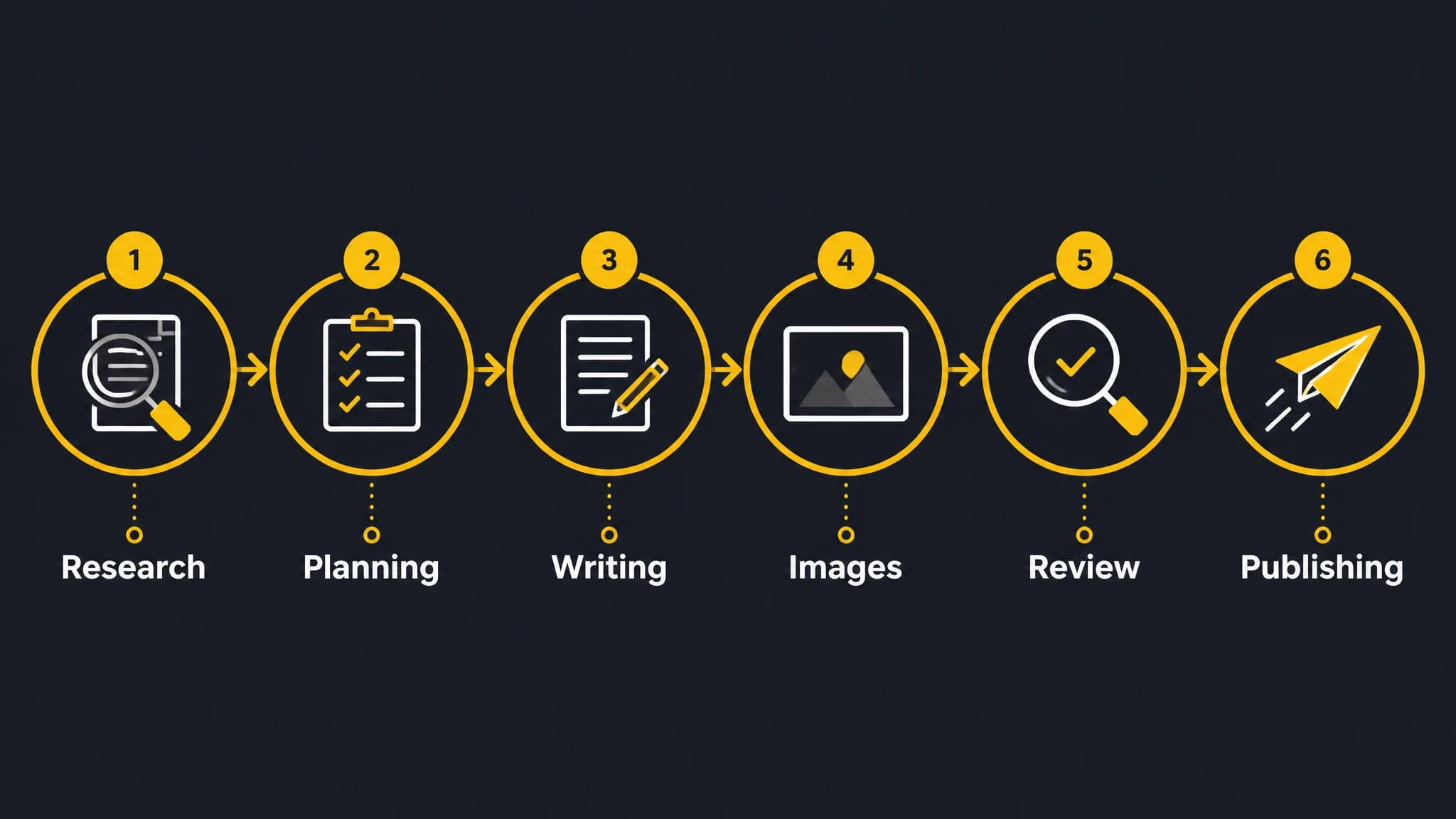
A visual workflow helps connect article planning, image creation, review, and publishing.
Use comparison graphics for decisions
Comparison visuals help readers evaluate alternatives, such as manual image sourcing versus an automated workflow. The graphic can highlight differences in time, consistency, and process complexity without making unsupported numerical claims.
For example, the labels might be:
- "Manual search"
- "Prompt creation"
- "Asset review"
- "CMS upload"
The goal is to clarify the workflow, not to suggest that automation removes the need for editorial review.
Use annotated illustrations for concepts
Some SEO topics are abstract. An annotated illustration can show how an image fits into an article page, including the cover image, inline visual, caption, and alt text. This format is especially helpful when teaching a process to beginners.
Build a repeatable prompt system
One-off prompts often produce inconsistent results. A repeatable prompt system gives every article a clearer visual identity and makes automation easier to manage.
Start with a prompt template that includes the following fields:
- Article topic
- Audience
- Search intent
- Section purpose
- Visual format
- Subject and setting
- Composition
- Mood and color direction
- Aspect ratio
- Elements to avoid
For example, a prompt for an article about SEO content workflows could follow this structure:
Create a clean editorial process diagram for an SEO blog article about automated content production. Show six connected stages: "Research," "Planning," "Writing," "Images," "Review," and "Publishing." Use a simple professional layout, high contrast, generous spacing, and a modern yellow and dark charcoal palette. Keep labels short and legible. No logos, fake statistics, or decorative filler text.
The template should describe the visual objective, not just the subject. "Create an image about SEO" is too broad. "Create a process diagram showing how article images move from planning to publication" gives the system a clear job to perform.
Generate images from the article structure
The article outline is one of the strongest sources of context for image generation. It shows which sections are educational, which are procedural, and which may benefit from an example.
A useful rule is to create an image only when it does at least one of these things:
- Explains a process
- Summarizes a framework
- Helps the reader compare options
- Illustrates an unfamiliar concept
- Creates a useful visual pause in a long section
A 1,500-word article may need only a cover image and two inline visuals. More images are not automatically better. Excessive visuals can slow a page, interrupt reading, or make the article feel artificially decorated.
The article generator and image workflow should therefore share the same brief. When the text identifies the intended audience, topic, tone, and section goals, the image system can produce assets that feel connected to the content rather than randomly selected.
If you are also building the written portion of this workflow, an AI SEO content generator can help connect keyword targeting, search intent, article structure, metadata, and image planning in one repeatable process.
Add SEO metadata to every generated image
Generated images still need basic optimization before publication. The visual itself is only one part of the asset's search and accessibility value.
Write descriptive filenames
Use a short filename that describes the image and section. For example:
automated-seo-content-workflow.webparticle-image-generation-process.webpmanual-vs-automated-image-workflow.webp
Avoid filenames such as image1.png, final-new-2.jpg, or long strings of unrelated keywords. The filename should be understandable to a person managing the media library.
Create useful alt text
Alt text should describe the meaningful content of the image. It should not repeat the article title or list every visual detail.
Weak alt text:
SEO blog image
More useful alt text:
Diagram showing the six stages of an automated SEO content workflow
For decorative images, an empty alt attribute may be appropriate. Do not force keywords into alt text when they do not describe the visual.
Use captions when they add context
A caption is useful when the reader benefits from a short explanation, source note, or interpretation. It is not necessary for every image. If the image is self-explanatory and the surrounding paragraph already provides context, omitting the caption may create a cleaner reading experience.
Compress and size images
Large image files can affect page performance. An automated workflow should create appropriately sized assets, use modern formats where supported, and avoid uploading a full-resolution image when the article only displays a smaller version.
Compression should preserve legibility. This matters especially for diagrams and graphics with labels, where aggressive compression can make text blurry.
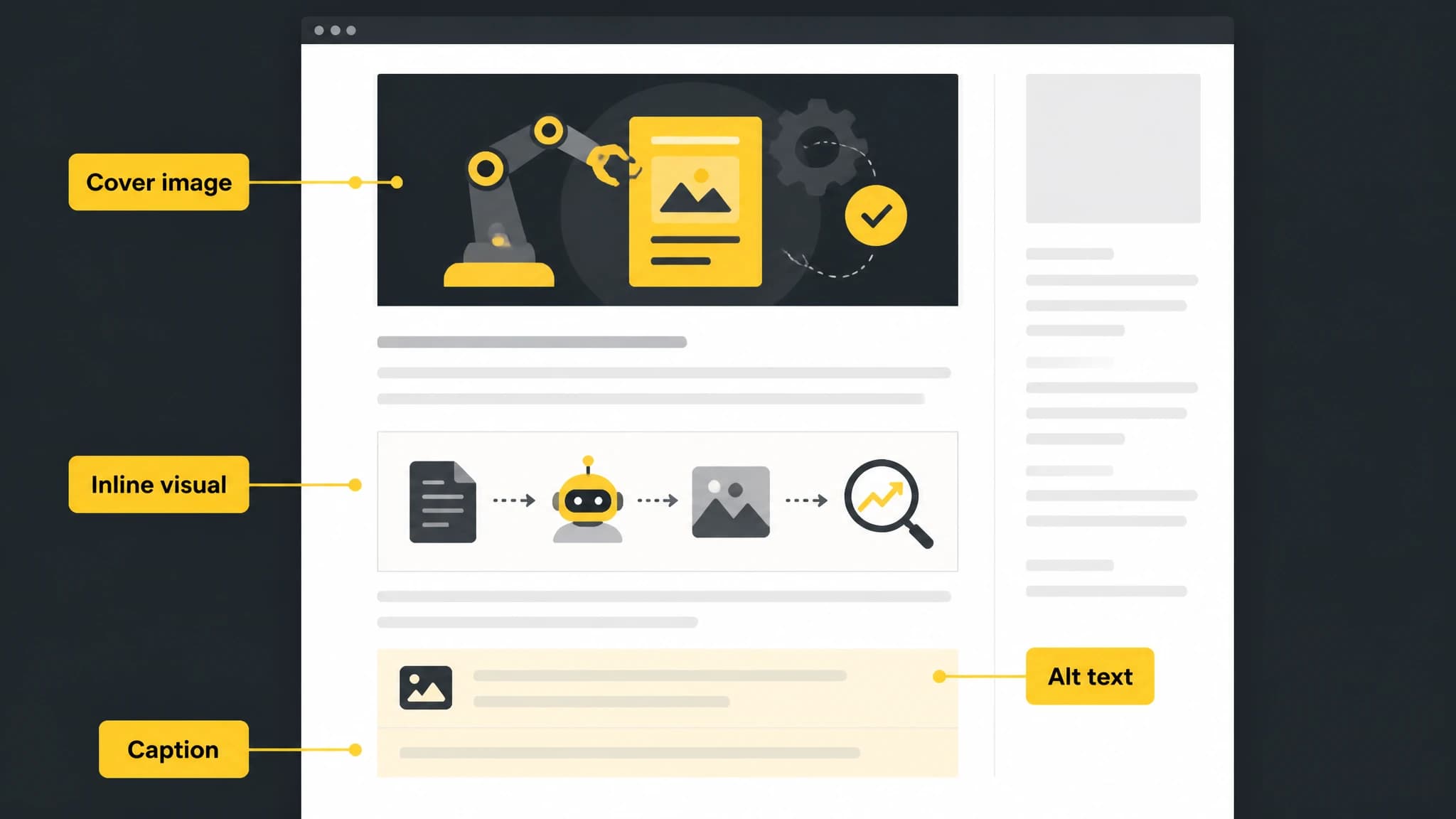
Image placement, alt text, and captions should work together to support the reader.
Add a human review checkpoint
Automation improves speed, but it does not eliminate the need for review. Image models can produce distorted objects, incorrect visual details, awkward text, or compositions that do not match the article.
A simple review checklist can catch most problems:
- Does the image accurately represent the section?
- Is any visible text spelled correctly?
- Are diagrams readable on a small screen?
- Does the style fit the website?
- Are there accidental logos or invented brand elements?
- Is the image free from distracting artifacts?
- Is the file size reasonable?
- Does the alt text describe the actual image?
For graphics containing text, review is particularly important. If the generated text is unreliable, create the background visual with the image system and add the final labels using a controlled design process.
Human review also protects the article from visual overstatement. A polished image can make an unsupported claim appear more credible, so the visual should never imply statistics, customer results, certifications, or product capabilities that the article cannot verify.
Connect image generation to blog automation
The greatest value appears when image generation is connected to the rest of the publishing workflow. Otherwise, the team may still spend time downloading files, renaming assets, and placing them manually.
A connected blog automation process can work like this:
- A topic and target keyword are added to the content plan.
- The system creates an article brief and outline.
- The article draft and image requirements are generated together.
- Cover and inline visuals are created from section-specific prompts.
- Metadata, filenames, and alt text are prepared.
- A reviewer checks the article and visuals.
- The post is scheduled or published to the website.
- The team monitors performance and refreshes the content when needed.
This structure turns images from an afterthought into a standard part of content production.
RankWorker is designed for this type of repeatable workflow. It can plan and generate SEO content, create article images, prepare metadata, schedule posts, and publish through supported WordPress, Next.js, Direct API, or Webhook integrations. The benefit is not that every visual decision is made without oversight. The benefit is that the repetitive steps are organized into one content operation.
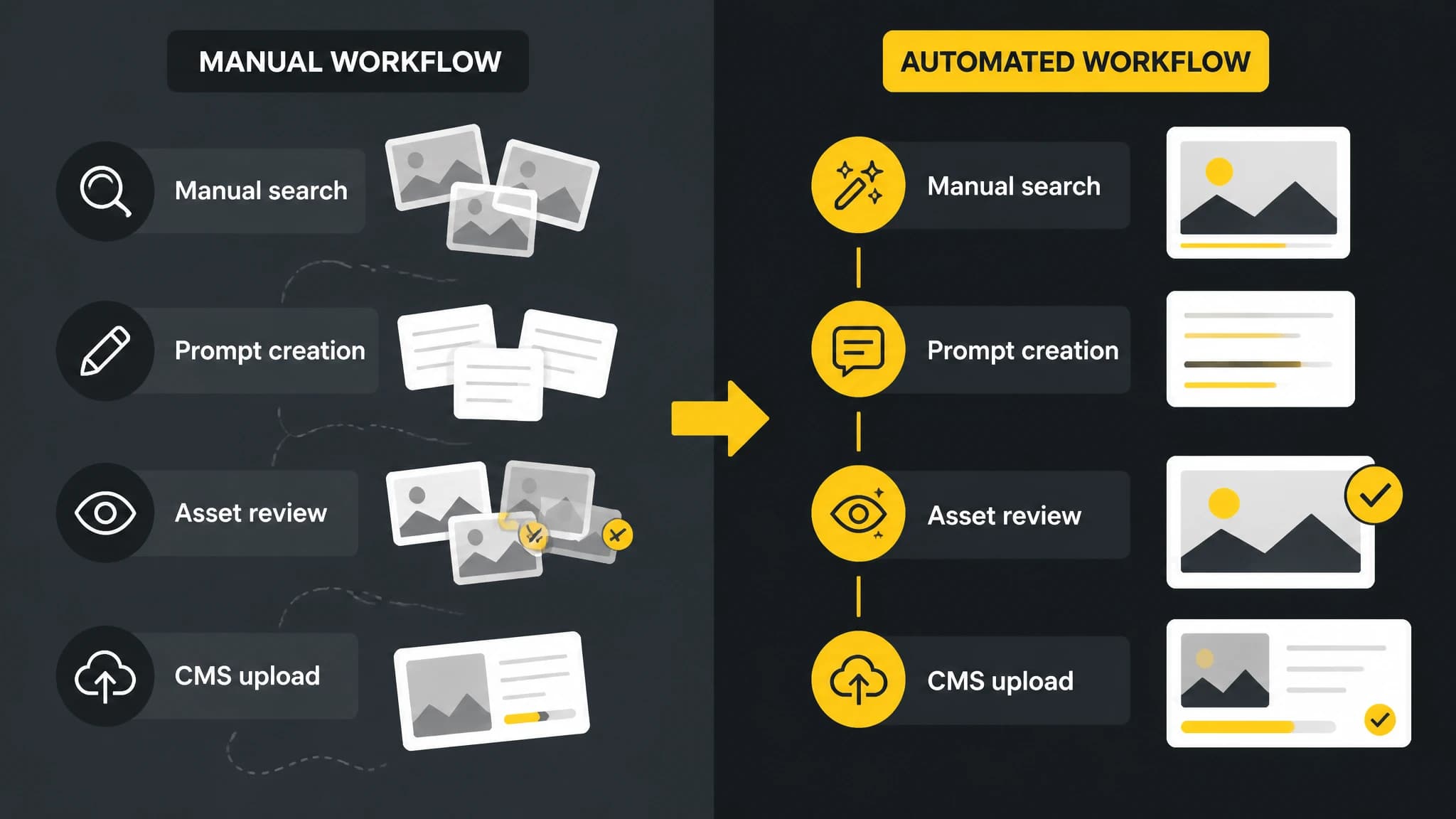
Automation is most useful when it reduces repeated production steps without removing editorial review.
How to choose an image automation workflow
The right level of automation depends on your publishing volume, team structure, and quality requirements.
For a small site
A lightweight process may be enough: generate one cover image, add an occasional diagram, and review every asset manually. This is suitable when you publish only a few articles each month.
For a growing content program
Use templates for image prompts, filenames, alt text, aspect ratios, and brand direction. Define which article sections commonly need visuals so writers and editors do not make the decision from scratch every time.
For a high-volume publishing workflow
Connect topic planning, article generation, image creation, review, scheduling, and publishing. Establish clear approval states such as "Draft," "Needs visual review," "Ready to publish," and "Published." This makes it easier to identify where work is waiting and prevents unfinished articles from going live.
If you are improving the broader production system, this guide to automating content creation can help you think through prompts, quality controls, review steps, and publishing responsibilities beyond image generation alone.
Common mistakes to avoid
Generating generic images for every post
A generic laptop photo may look professional, but it rarely adds meaning. Prioritize visuals that reflect the article's specific idea or help explain something difficult.
Treating visual style as an afterthought
A blog can feel inconsistent when every article uses a different style. Define a small set of visual directions, such as editorial photography, process diagrams, and minimal conceptual illustrations.
Adding too much text to graphics
On-image text should be brief. If readers need a paragraph to understand the graphic, place the explanation in the article instead.
Publishing without checking generated text
Image generation tools may produce misspelled or distorted labels. Review every graphic that contains words before publication.
Ignoring accessibility
Images should support the reader, not create an obstacle. Use meaningful alt text, sufficient contrast, readable labels, and captions when they genuinely help.
Measuring output instead of usefulness
The number of generated images is not a meaningful success metric. Evaluate whether the visuals improve comprehension, engagement, consistency, production speed, and the quality of the published page.
A practical implementation checklist
Before adding automated article image generation to your SEO process, define:
- Which article types need cover images
- Which sections benefit from diagrams or illustrations
- Your approved visual styles
- Image dimensions and file formats
- Filename and alt text conventions
- Who reviews generated assets
- Which publishing system receives the images
- What happens when an image fails review
- How image performance and content quality will be evaluated
Start with one article type and a small number of visual formats. Once the workflow is reliable, expand it to other content categories. This incremental approach makes it easier to identify prompt problems, review gaps, and publishing issues before they affect a large content library.
Conclusion
Automating article image generation can remove one of the most time-consuming parts of SEO publishing. The strongest systems do more than create attractive pictures. They connect each visual to the article's intent, select a format that helps the reader, optimize the asset for accessibility and performance, and include a clear review step.
For busy founders and website owners, this makes blog automation more complete. Instead of treating images as a last-minute task, you can generate and manage them alongside the article, metadata, schedule, and publishing workflow. The result is a more consistent content engine that saves time without sacrificing editorial judgment.