

 Veselin Stoyanov14 min read
How to Use a Content Publishing API for Automated SEO
Learn how a content publishing API supports automated SEO, headless publishing, content workflows, and scalable delivery across custom websites.

How to Use a Content Publishing API for Automated SEO
Publishing SEO content consistently is difficult when every article requires the same manual steps: choosing a keyword, briefing a writer, reviewing the draft, uploading images, entering metadata, formatting the page, and publishing it in a CMS.
A content publishing API helps remove that repetition. It connects your content operation to your website, application, deployment pipeline, or headless CMS so content can move through your system programmatically.
Instead of treating every article as a one-off publishing task, you can build a repeatable workflow for planning, generating, reviewing, and delivering SEO content.
This guide explains what a content publishing API is, how it differs from a content delivery API, how to design an automated SEO workflow, and what to consider before connecting one to your website.
What is a content publishing API?
A content publishing API is an interface that allows software to create, update, schedule, or retrieve content through HTTP requests rather than a graphical dashboard.
For example, an application might use an API to:
- Create a draft article
- Send article content to a website
- Upload or associate images
- Add titles, descriptions, slugs, and other metadata
- Schedule publication
- Retrieve published content
- Trigger a build or deployment
- Synchronize content with another system
The API acts as a bridge between your content workflow and the system that displays the content.
A traditional workflow might look like this:
- A marketer creates an article in a content platform.
- Someone copies the article into a CMS.
- Images are downloaded and uploaded separately.
- SEO metadata is entered manually.
- A developer formats or deploys the page.
With an API-based workflow, those steps can be connected. Your application can fetch content and publish it through its own logic, either at build time or while the site is running.
The exact capabilities depend on the API. Some APIs are designed mainly for retrieving content, while others support the broader publishing lifecycle, including creation, updates, scheduling, and delivery.
Content publishing API vs. content delivery API
The terms content publishing API and content delivery API are related, but they usually describe different parts of the content lifecycle.
Content publishing API
A content publishing API focuses on getting content into a publishing system or website. It may support actions such as creating content, updating records, attaching metadata, and initiating publication.
It is most useful when you want to automate the process of moving content from production into your website or application.
Content delivery API
A content delivery API focuses on getting content out of a content source and into the experience where users consume it. A frontend may request articles, categories, images, and metadata, then render them in a custom interface.
It is commonly used with headless CMS architectures, static site generators, mobile applications, and custom websites.
Why the distinction matters
Some platforms support both functions. Others specialize in one direction.
When evaluating an API, ask:
- Can it only retrieve content, or can it also create and update content?
- Does it provide SEO fields such as metadata and slugs?
- Can it return images and publishing information?
- Does it support build-time and runtime workflows?
- Can it connect to your existing application without replacing your frontend?
Understanding these differences helps you choose an architecture that matches your publishing process instead of forcing your website into a new system.
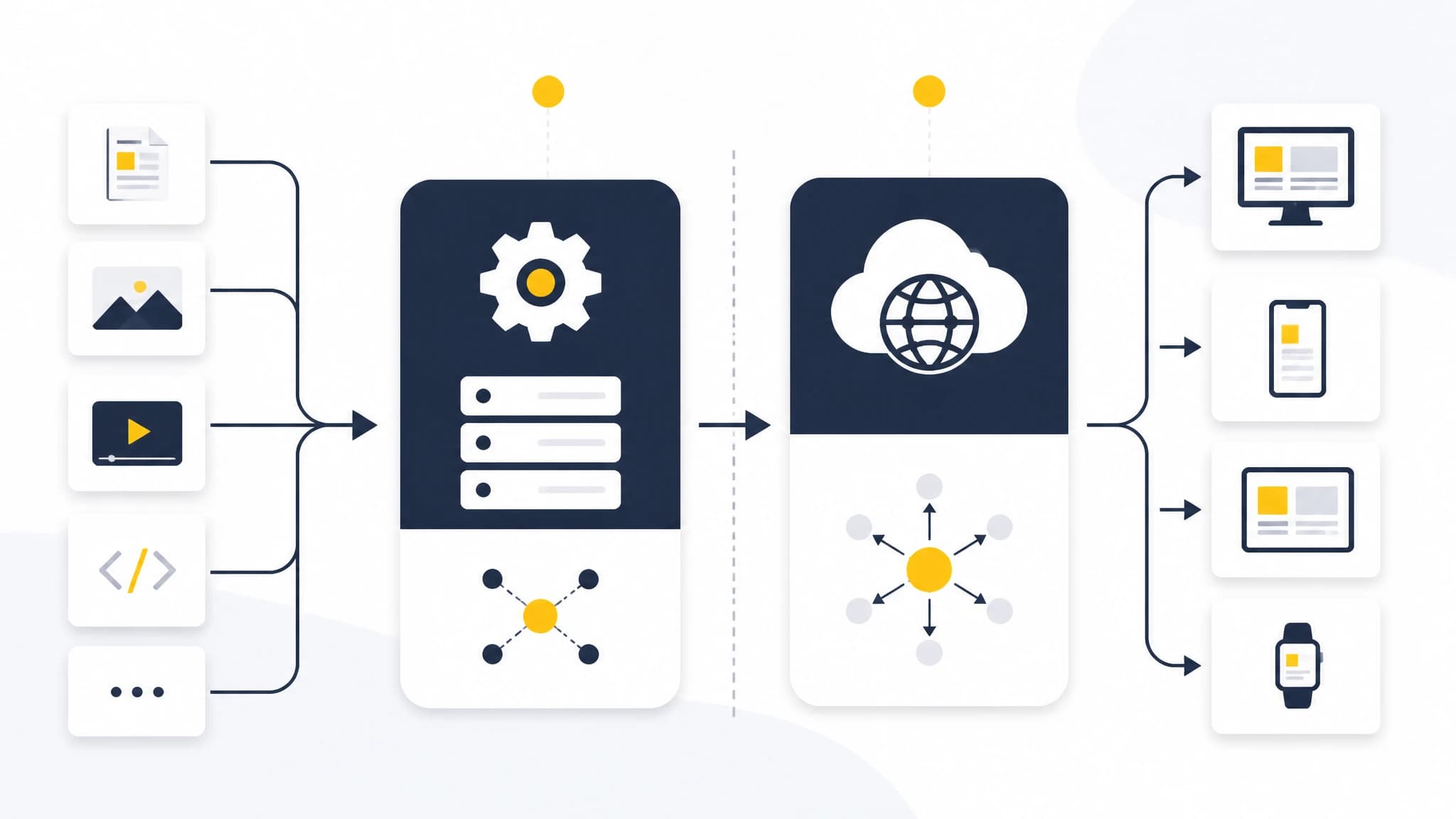
Publishing APIs move content into a system, while delivery APIs provide content to the frontend.
Why use an API for automated SEO?
SEO content often involves predictable, repeatable operations. That makes it a strong candidate for automation, provided that quality control remains part of the workflow.
1. Reduce repetitive publishing work
Manual publishing creates operational friction. Even when the article itself is ready, formatting, metadata, images, categorization, and scheduling can take additional time.
An API can transfer structured content into your publishing environment so your team does not need to repeat the same administrative steps for every post.
2. Keep content and presentation separate
An API-based system can store or provide the content while your website controls how that content appears.
This separation is useful for businesses with custom frontends, static websites, multiple channels, or a development team that wants full control over templates and presentation.
3. Support repeatable workflows
A reliable SEO program needs more than occasional article creation. It needs a process that can be repeated across topics, websites, authors, and publishing dates.
A content publishing API can become one part of that process by connecting content generation with your existing tools, review steps, and deployment systems.
4. Publish across custom technology stacks
A conventional CMS may work well for a standard website, but it may not fit a custom application or a specialized publishing stack.
An API allows your application to request and process content using its own programming language, data model, templates, and deployment process.
5. Improve consistency
Automated workflows can apply the same rules to every article. For example, your system might validate that each article has a slug, title, description, featured image, and target keyword before publication.
Automation does not guarantee good content, but it can reduce preventable process errors.
How a content publishing API fits into an SEO workflow
A content publishing API is most valuable when it is connected to the full content lifecycle rather than used as an isolated export tool.
A practical automated SEO workflow can include the following stages.
Step 1: Plan the content
Start with a content plan based on your audience, business priorities, and keyword targets. Define the purpose of each article before generating it.
Useful planning fields include:
- Primary keyword
- Supporting keywords
- Search intent
- Proposed title
- URL slug
- Target audience
- Internal linking opportunities
- Desired call to action
- Review status
- Planned publication date
This gives your automation system structured information to work with.
Step 2: Generate or prepare the article
The content production system creates the article or receives it from another source. At this stage, retain the structured fields that your website will need later.
Do not treat the article as plain text only. SEO publishing often requires a complete content package, including the body, metadata, images, alt text, and publishing details.
Step 3: Review before publication
Automated publishing should not mean unreviewed publishing.
Create a review step that checks:
- Accuracy and completeness
- Search intent alignment
- Brand voice
- Claims and supporting evidence
- Formatting
- Links and calls to action
- Metadata quality
- Image relevance and accessibility
Depending on your business, the review may be manual, automated, or a combination of both.
Step 4: Fetch the content through the API
Once the article is ready, your application authenticates with the content publishing API and requests the content it needs.
The application may retrieve the article body, images, metadata, and publishing data, then map those fields to your own content model.
Step 5: Transform content for your stack
Different websites represent content differently. A Next.js application may convert an article into a page during a build. A custom application may store the data in a database. A static site may transform the API response into Markdown or HTML.
Keep this transformation layer explicit. It makes it easier to test your integration and change your frontend without rebuilding the entire content workflow.
Step 6: Publish at build time or runtime
There are two common delivery patterns:
Build-time publishing fetches content during a build or deployment. This is useful when you want generated pages to be compiled before visitors request them.
Runtime publishing fetches content when the application handles a request. This can be useful when content needs to be retrieved dynamically through application logic.
Your choice depends on your framework, caching strategy, update frequency, and performance requirements.
Step 7: Validate the published result
After publication, verify that the page works as expected. Check the URL, title tag, meta description, headings, canonical settings, structured data, images, and mobile layout.
A successful API request only confirms that data moved between systems. It does not prove that the final page is technically or editorially correct.

A dependable workflow connects planning, review, API delivery, deployment, and validation.
Using a content delivery API with a headless CMS
A headless CMS API separates content management from the frontend presentation layer. The CMS manages structured content, while a website, application, or other channel consumes that content through an API.
This approach can be useful when:
- You have a custom frontend
- You publish to multiple channels
- You want developers to control page templates
- You need content reuse across websites or applications
- Your website is built with a framework rather than a traditional CMS
A content delivery API is often the mechanism that connects the headless content source to the frontend.
However, a headless architecture also introduces responsibilities. Your team may need to manage authentication, caching, preview environments, content validation, image handling, error states, and deployment triggers.
Before adopting a headless CMS API, document which system owns each responsibility:
| Responsibility | Possible owner |
|---|---|
| Content planning | SEO or marketing team |
| Article generation | Content platform or editorial workflow |
| Review and approval | Marketing, subject-matter expert, or editor |
| Content storage | CMS or content platform |
| Page rendering | Website frontend |
| Deployment | Hosting or CI/CD system |
| Analytics | Measurement platform |
Clear ownership prevents gaps between content production and website delivery.
RankWorker as a content source for a custom stack
If you already have a custom website or application, you may not want to replace your existing frontend just to automate SEO content.
RankWorker’s Direct API integration is designed to let an application fetch generated articles, assets, metadata, and publishing data directly from RankWorker. The integration supports custom websites, static site generation, dynamic publishing, CI/CD pipelines, and workflows where RankWorker acts as a content source while the site retains control over presentation. (rankworker.com)
The documented workflow is straightforward:
- Create a secure API key in the RankWorker dashboard.
- Authenticate requests from your application.
- Fetch articles, images, metadata, or other generated content.
- Render the content in your application at build time or runtime. (rankworker.com)
This makes the Direct API relevant for teams that want to connect SEO content production to an existing technical workflow rather than manually copy content into a website.
For example, a development team could use the API to retrieve approved content during a deployment process, map the returned fields to its page template, and publish the resulting page through its existing infrastructure. The implementation details will depend on the application and the API contract, so confirm the available request and response fields before building the integration.
API design considerations for SEO teams
Before implementing a content publishing API, align technical decisions with editorial requirements.
Authentication and secret management
Protect API keys and credentials. Store them in server-side environment variables or a secrets manager, not in browser code or public repositories.
Use separate credentials for development and production when the platform supports it, and limit access to the systems that need it.
Idempotency and duplicate prevention
Your integration should avoid creating duplicate pages when a deployment is retried or a request is repeated.
Use a stable identifier, slug, or content ID to determine whether an article already exists. Define how updates should be handled before enabling automated publication.
Draft, review, and published states
Do not rely on a single boolean such as published: true if your workflow needs more control. Distinguish between planned, generated, in review, approved, scheduled, published, and archived states where appropriate.
This gives your team a clear way to stop an article from being published while still allowing the rest of the workflow to continue.
Metadata completeness
Make sure your API integration handles the fields search engines and users need. At minimum, review the title, description, slug, canonical URL rules, headings, image alt text, and publication date.
The API may provide these fields, but your website still needs to place them correctly in the final HTML.
Error handling and observability
Requests can fail because of authentication issues, timeouts, rate limits, invalid data, or deployment problems.
Log enough information to diagnose failures without exposing secrets or sensitive content. Add alerts for failed publishing jobs and create a manual recovery process.
Caching and revalidation
Decide how often your application should request fresh content. Aggressive caching can improve performance but may delay updates. Frequent uncached requests can increase load and complicate reliability.
Your caching strategy should match your publication schedule and the way your framework handles rebuilds or revalidation.
Common mistakes to avoid
Automating before defining the workflow
An API cannot fix an unclear editorial process. Define ownership, approval rules, content states, and publication requirements first.
Publishing every generated draft automatically
Generation and publication are separate decisions. Add quality checks and approval gates when accuracy, compliance, or brand risk matters.
Ignoring the final page output
Structured API data can still produce a poor page if templates omit metadata, images are broken, or headings are rendered incorrectly. Test the complete user-facing result.
Building a one-way integration with no update strategy
Articles may need corrections, refreshes, redirects, or retirement. Decide how changes made in the content source will be reflected on the website.
Treating API availability as a content strategy
Technical automation supports publishing; it does not determine which topics deserve coverage. Continue to use search intent, audience needs, subject expertise, and performance data to guide your editorial choices.
A practical implementation checklist
Use this checklist before launching an automated SEO publishing workflow:
- Define the content model and required fields.
- Map each API field to your website’s data model.
- Decide whether content is fetched at build time or runtime.
- Secure API credentials on the server.
- Add draft and approval states.
- Prevent duplicate publication.
- Validate slugs and metadata.
- Handle images and alt text correctly.
- Add retries and useful error logging.
- Test updates, removals, and redirects.
- Confirm the final HTML and indexability.
- Monitor publishing failures after launch.
The goal is not to automate every possible action. The goal is to create a dependable path from approved SEO content to a correctly rendered, maintainable page.
Conclusion
A content publishing API gives businesses a programmatic way to connect content production with the systems that publish and deliver their pages. It can reduce repetitive work, support custom technology stacks, and make SEO operations easier to repeat at scale.
The strongest implementations combine automation with clear editorial controls. Plan content first, preserve structured metadata, protect credentials, validate the final page, and define how updates will work.
For teams using a custom website, static site, or application, RankWorker’s Direct API can serve as a content source for generated articles, assets, metadata, and publishing data while your own stack controls rendering and deployment. (rankworker.com)