

 Veselin Stoyanov13 min read
Next.js Headless CMS: How to Manage and Publish SEO Content
Learn how to model, optimize, preview, publish, and deliver SEO content with a Next.js headless CMS and API-driven workflow.

Next.js Headless CMS: How to Manage and Publish SEO Content
A Next.js headless CMS separates content management from the frontend that displays it. This gives developers control over the website experience while allowing editors to manage articles, landing pages, metadata, images, and publishing workflows in a structured system.
The important distinction is that headless architecture does not automatically make a website SEO-friendly. Your system still needs a reliable content model, crawlable page delivery, complete metadata, preview workflows, and a clear publishing process.
This guide explains how to design that workflow for a Next.js website, from modeling content to delivering published pages through an API.
What is a Next.js headless CMS?
A Next.js headless CMS is a content management system that stores and organizes content independently from the website frontend. Instead of generating the entire page inside the CMS, the CMS exposes content through an API. Next.js then retrieves that content and renders the final page.
A typical architecture includes:
- A headless CMS for editing and storing structured content.
- An API layer for delivering drafts or published content.
- A Next.js frontend for rendering pages, layouts, metadata, and navigation.
- A publishing workflow that controls when content becomes publicly accessible.
- Preview support so editors can review unpublished content before release.
This approach is useful when a business wants a custom frontend, multiple content channels, or more control over performance and deployment. It also makes content operations more independent from frontend changes.
However, the separation introduces responsibilities. Someone must define the content schema, map API fields to page components, handle missing data, generate metadata, manage previews, and ensure that published URLs remain stable.
For broader technical guidance, see our guide to Next.js SEO best practices.
Content requirements for an SEO-ready Next.js CMS
Before choosing fields or building API queries, define what the website needs to publish successfully. A useful model should support both the visible page and the search signals around it.
At minimum, most SEO content types need the following fields:
- Title: The visible page title and a potential source for the SEO title.
- Slug: The URL path for the page.
- Summary: A short description for cards, previews, and editorial workflows.
- Body content: The main structured or rich-text content.
- SEO title: The title used in the HTML metadata when it differs from the visible heading.
- Meta description: A concise description of the page.
- Canonical URL: The preferred URL when similar or duplicate versions exist.
- Featured image: The primary visual associated with the article.
- Image alt text: A useful description for accessibility and image context.
- Author information: The person or organization responsible for the content.
- Publication date: When the content was first published.
- Updated date: When the content was materially revised.
- Status: Such as draft, review, scheduled, or published.
- Category and tags: Taxonomy fields that support organization and related content.
You may also need content-specific fields. A product page could require benefits, use cases, and calls to action. An article could need an FAQ list, table of contents settings, or related content references.
The goal is not to create the largest possible schema. It is to create a model that is complete enough for consistent publishing without forcing editors to work around missing fields.
Model content around reusable components
A headless CMS becomes easier to maintain when recurring page sections are modeled as reusable components. Examples include callout boxes, author blocks, comparison tables, related article lists, and image sections.
This is usually better than storing every page as one unstructured block of text. Structured components give the Next.js frontend predictable data and allow editors to assemble pages without asking developers to create a new layout for every article.
At the same time, avoid over-modeling simple content. If every sentence requires a separate field, the editorial workflow becomes slow and difficult to understand. Use structured fields where they improve consistency, reuse, or validation.
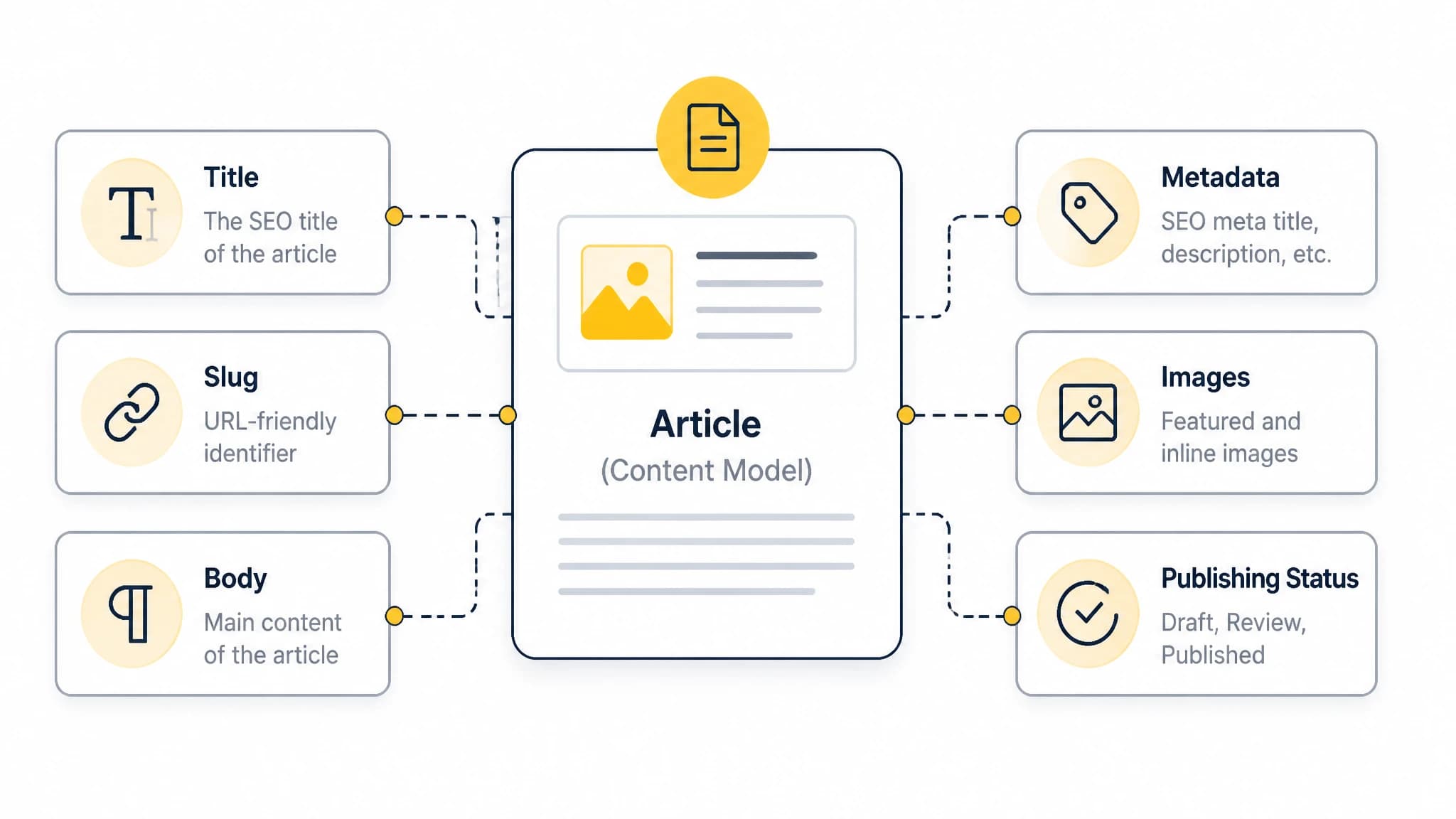
A complete content model gives the frontend the fields it needs to render useful pages and metadata.
Managing SEO metadata in Next.js
Metadata should be treated as part of the publishing workflow, not as an afterthought added after an article is written.
For each page, your Next.js application should be able to retrieve the relevant SEO fields and use them to generate the document metadata. With the App Router, this commonly includes page titles, descriptions, canonical URLs, Open Graph data, and other social sharing fields.
A practical metadata workflow looks like this:
- The editor creates or selects the primary keyword and page topic.
- The content record receives an SEO title and meta description.
- The frontend retrieves those fields through the CMS API.
- Next.js generates the page metadata from the record.
- A preview or validation step checks for missing, duplicated, or excessively long values.
- The published page exposes metadata that matches its visible content and URL.
Do not automatically use the article title as every metadata field. Defaults are useful, but editors should be able to override them when the search result needs a more specific title or description.
You should also define fallback behavior. If an SEO title is empty, the system may use the visible title. If the description is missing, it may use the summary. The fallback should be intentional and should not silently produce empty tags across a large content library.
Our guide to Next.js metadata SEO covers the metadata decisions that matter when using the App Router.
Drafts, previews, and editorial review
A strong Next.js headless CMS workflow must distinguish between draft content and public content. Editors need to see how a page will look before it is available to search engines or website visitors.
Preview mode should answer practical questions:
- Does the page render the intended content type?
- Are headings and internal links displayed correctly?
- Does the featured image load with useful alt text?
- Are the title and meta description populated?
- Does the page use the correct URL?
- Are related articles, categories, and author details present?
- Does the layout work on mobile devices?
The preview environment should use draft content without accidentally exposing it through the public site. This requires clear separation between preview requests and normal published requests.
A useful editorial status flow might be:
Draft -> Review -> Approved -> Scheduled -> Published
Not every team needs all five stages. The important point is that status should be explicit. A page should not become public merely because an editor saved a draft, and a scheduled page should not depend on someone remembering a manual deployment step.
Preview links should also be tested when content includes dynamic sections. A page may appear correct with basic text but fail when an optional image, related content reference, or embedded component is missing.
Publishing SEO content through a headless CMS API
The content management API is the connection between your editorial system and Next.js frontend. It should deliver the fields required to render a complete page, not just the article body.
A useful API response may include:
- The content identifier.
- The title and slug.
- The article body or structured blocks.
- SEO metadata.
- Image URLs and alt text.
- Author and date information.
- Category and tag relationships.
- Publication status.
- Related content references.
The API should make it easy for the frontend to request published content by slug. It should also support the data needed for listing pages, category archives, search features, and related articles.
Handle API failures and incomplete records
API delivery is part of the user experience and the SEO system. If a request fails, the website should respond in a controlled way rather than rendering a broken page or returning misleading content.
Plan for:
- Missing slugs.
- Unpublished records.
- Deleted or redirected content.
- Empty optional fields.
- Invalid image references.
- Temporary API failures.
- Changes to the content schema.
For important pages, consider how the application should handle a failed request during build or runtime. The correct behavior depends on your rendering and deployment setup, but it should be defined before publishing at scale.
Stable URLs are particularly important. If an editor changes a slug, the workflow should either preserve the old URL or create an intentional redirect. Changing URLs without a migration plan can break internal links and remove accumulated search visibility.
Scheduling and automated publishing
Publishing can happen in several ways depending on your CMS and deployment architecture. The key requirement is that the content record, frontend, and search-facing page move through the process consistently.
A scheduled publishing workflow may include:
- Create and optimize the content record.
- Send the draft for review.
- Approve the article and assign a publication time.
- Trigger a webhook or publishing event.
- Make the content available to the Next.js frontend.
- Revalidate or rebuild the affected page.
- Confirm that the public URL returns the correct content.
- Submit or expose updated sitemap information where appropriate.
Webhooks are useful because they can notify another system when content changes. In a Next.js workflow, a content update may need to trigger a page revalidation, deployment process, cache refresh, or related automation.
Do not assume that a webhook alone completes publishing. Define what happens after the event is received, how failures are reported, and how the team can retry an unsuccessful update.
With RankWorker, we support workflows that connect content planning and production with publishing through options including our Next.js integration, Direct API, and webhooks. Use only the delivery path that matches your application architecture and confirm the required implementation details with your development team.
Building a repeatable Next.js SEO content workflow
A reliable workflow connects strategy, production, optimization, and delivery. It should not require developers to manually copy every article into the frontend or editors to guess which fields are required.
A practical process is:
1. Find and prioritize topics
Start with search demand, audience problems, business relevance, and existing coverage. Group related topics so that articles support a clear site structure instead of competing with one another.
2. Create a content brief
Define the search intent, primary keyword, supporting topics, proposed title, URL slug, internal links, audience, and desired action. The brief should explain what the page needs to accomplish, not simply list keywords.
3. Produce the article and media
Write for the reader first. Include useful examples, clear headings, accurate explanations, and images that support comprehension. Make sure the content can be represented cleanly in the CMS model.
4. Complete metadata and content fields
Before approval, check the SEO title, description, canonical URL, author, dates, image data, alt text, categories, and related content references.
5. Preview the rendered page
Review the actual Next.js page, not only the CMS editor. Check layout, links, headings, metadata, mobile behavior, and any dynamic components.
6. Publish and verify
After the content becomes public, check the final URL, status code, rendered HTML, metadata, images, sitemap inclusion, and internal links. Verification is especially important when publishing is automated.
Our Next.js blog CMS guide explains how the frontend, CMS, SEO requirements, and publishing workflow fit together.
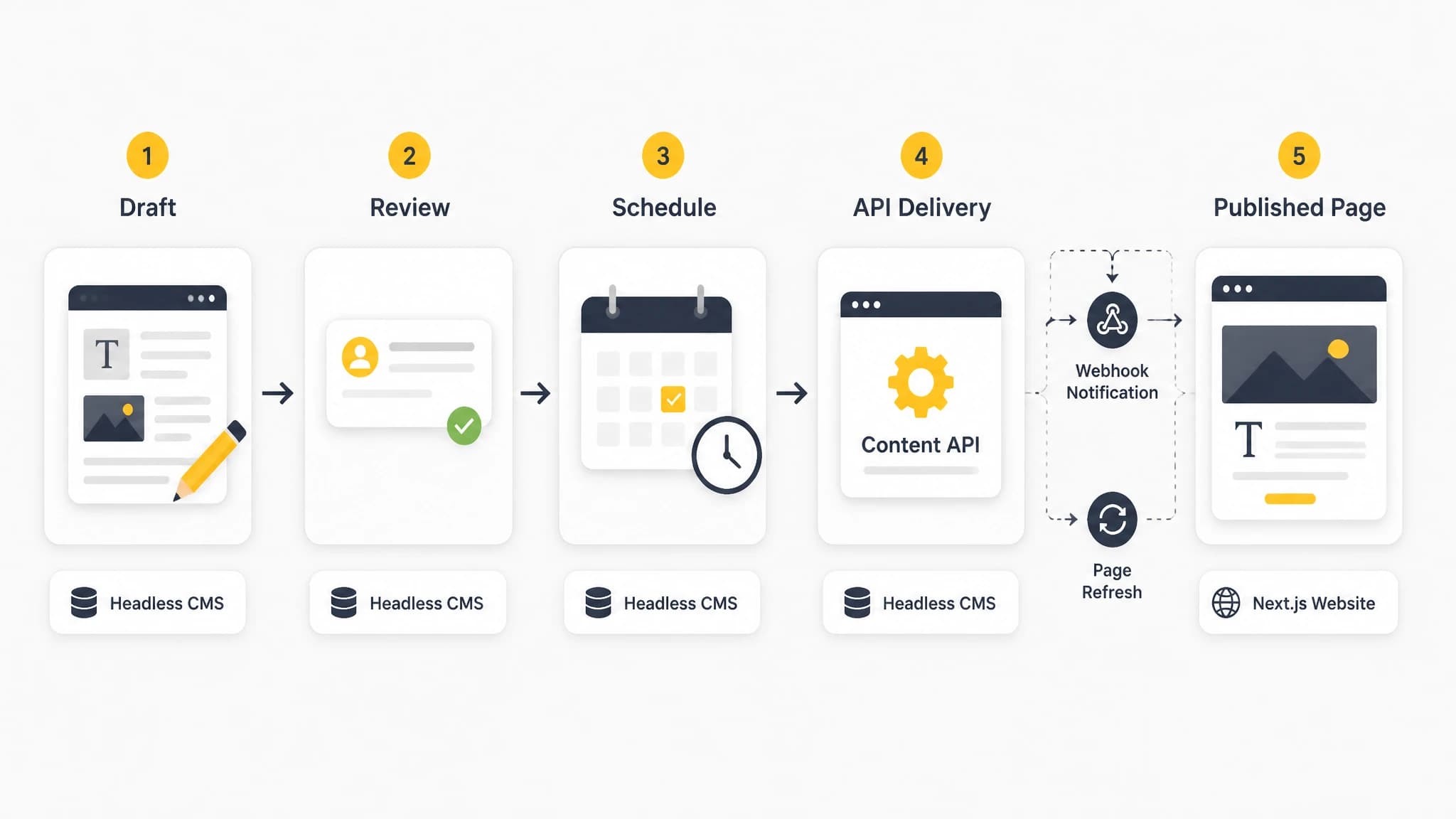
A defined workflow connects editorial approval, API delivery, frontend refresh, and public verification.
Common mistakes to avoid
Treating the CMS as the SEO system
A CMS stores and delivers content, but it does not automatically create strong URLs, metadata, internal links, structured data, or crawlable HTML. Those requirements must be designed across the CMS and Next.js application.
Using one unstructured body field for everything
A single rich-text field may be quick to launch, but it makes reusable layouts, validation, related content, and consistent metadata harder to manage.
Publishing drafts accidentally
Separate draft and published API responses. Test preview behavior and confirm that unpublished content is not accessible through public routes, feeds, or sitemaps.
Ignoring updates and redirects
Content changes are normal. Create a process for updating publication dates, preserving useful URLs, handling redirects, and refreshing pages when content changes materially.
Automating volume without quality controls
Automation is valuable when it reduces repetitive work while preserving editorial standards. Every workflow should include topic selection, human review where appropriate, metadata checks, rendering previews, and post-publication verification.
Final checklist for a Next.js headless CMS
Before launching or scaling your workflow, confirm that:
- Each content type has a clear schema.
- Slugs and redirects are managed intentionally.
- SEO titles and descriptions are available per page.
- Canonical URLs have defined fallback rules.
- Images include meaningful alt text.
- Draft and published content are separated.
- Editors can preview the actual frontend output.
- The API returns all fields needed by the page.
- Webhook and revalidation failures can be detected and retried.
- Published pages are included in the appropriate sitemap process.
- Internal links and related content are maintained.
- Content updates trigger the correct frontend refresh.
- The workflow includes quality checks before and after publication.
A Next.js headless CMS works best when content modeling, SEO metadata, previewing, API delivery, and publishing are treated as one system. The frontend remains flexible, but the content operation becomes predictable enough to scale.
With the right structure, your team can give editors a practical publishing experience without sacrificing control over performance, page templates, or search visibility.