

 Veselin Stoyanov12 min read
Next.js SEO Best Practices Checklist
Use this practical Next.js SEO checklist to improve crawlability, metadata, canonical URLs, performance, internal links, and publishing.

Next.js SEO Best Practices: A Practical Checklist for Content-Driven Websites
Next.js gives you the flexibility to build fast, content-rich websites, but the framework does not automatically guarantee strong search performance. Your pages still need crawlable content, descriptive metadata, consistent URLs, useful internal links, structured content, and a publishing process that prevents technical mistakes.
This checklist covers the most important Next.js SEO best practices for content-driven websites. It focuses on the parts developers and website owners can control: how pages render, how search engines understand them, and how new content moves from idea to published URL.
Quick checklist
Before publishing a content page, confirm that:
- The main content is available in the rendered HTML.
- The page has a unique title and meta description.
- The canonical URL is correct and absolute.
- The URL is stable, readable, and returns the correct status code.
- Important pages are included in your XML sitemap.
- Internal links connect the page to relevant content.
- Images have useful alt text and are properly sized.
- Structured data matches the visible page content.
- The page is usable on mobile and loads efficiently.
- Your publishing workflow updates the sitemap and supports discovery.
1. Make the primary content crawlable
The first Next.js SEO question is simple: can a search engine access the page content without depending on a browser interaction?
For most blog posts, guides, and landing pages, render the important content on the server or during static generation. The HTML response should contain the page heading, introductory copy, body content, links, and meaningful image references. A client-only page that initially returns an empty container can make discovery and interpretation less reliable.
In the App Router, Server Components are the default, which makes server-rendered content a natural starting point. Be careful when adding "use client" high in the component tree. Client Components are useful for interactive elements, but your article body should not become dependent on client-side fetching unless there is a clear reason.
For dynamic article routes, use a predictable pattern such as app/blog/[slug]/page.tsx. You can use generateStaticParams to prerender known routes at build time, or allow routes to render when first requested when your content volume or publishing model makes that more practical. The correct choice depends on how frequently content changes and how your deployment handles caching. (nextjs.org)
Crawlability checks
Inspect the production page, not only the React component. View the server response or use a rendered-page inspection tool and verify that:
- The article title appears as an H1.
- The main copy is present without clicking a tab or loading a client-side state.
- Links use normal anchor elements with valid destinations.
- Important content is not hidden behind an interaction.
- A missing article returns a real 404 instead of a visually empty page.
For a deeper look at Next.js content rendering, see our guide to Next.js MDX blog SEO.
2. Create unique metadata for every page
Metadata should describe the actual page a user will find after clicking the search result. Avoid using one generic title and description across every route.
With the App Router, define static metadata when values are known in advance and use generateMetadata when title, description, image, or canonical information depends on the route or fetched content. Next.js uses these APIs to generate the relevant head elements, and URL-based metadata should be configured with an appropriate metadataBase when you rely on relative paths. (nextjs.org)
A practical article metadata model might include:
export async function generateMetadata({ params }): Promise<Metadata> {
  const post = await getPost(params.slug)

  return {
    title: post.seoTitle ?? post.title,
    description: post.metaDescription,
    alternates: {
      canonical: `https://example.com/blog/${post.slug}`,
    },
    openGraph: {
      title: post.seoTitle ?? post.title,
      description: post.metaDescription,
      images: post.ogImage ? [post.ogImage] : undefined,
    },
  }
}
Use a title that identifies the topic and a description that explains the page's value. Do not fill metadata fields with keyword variations that do not appear naturally in the content.
A useful editorial rule is to store SEO fields with the content record, but give them sensible fallbacks. If an editor has not entered a custom SEO title, the page can use the article title. If there is no custom image, use a consistent default rather than emitting a broken image URL.
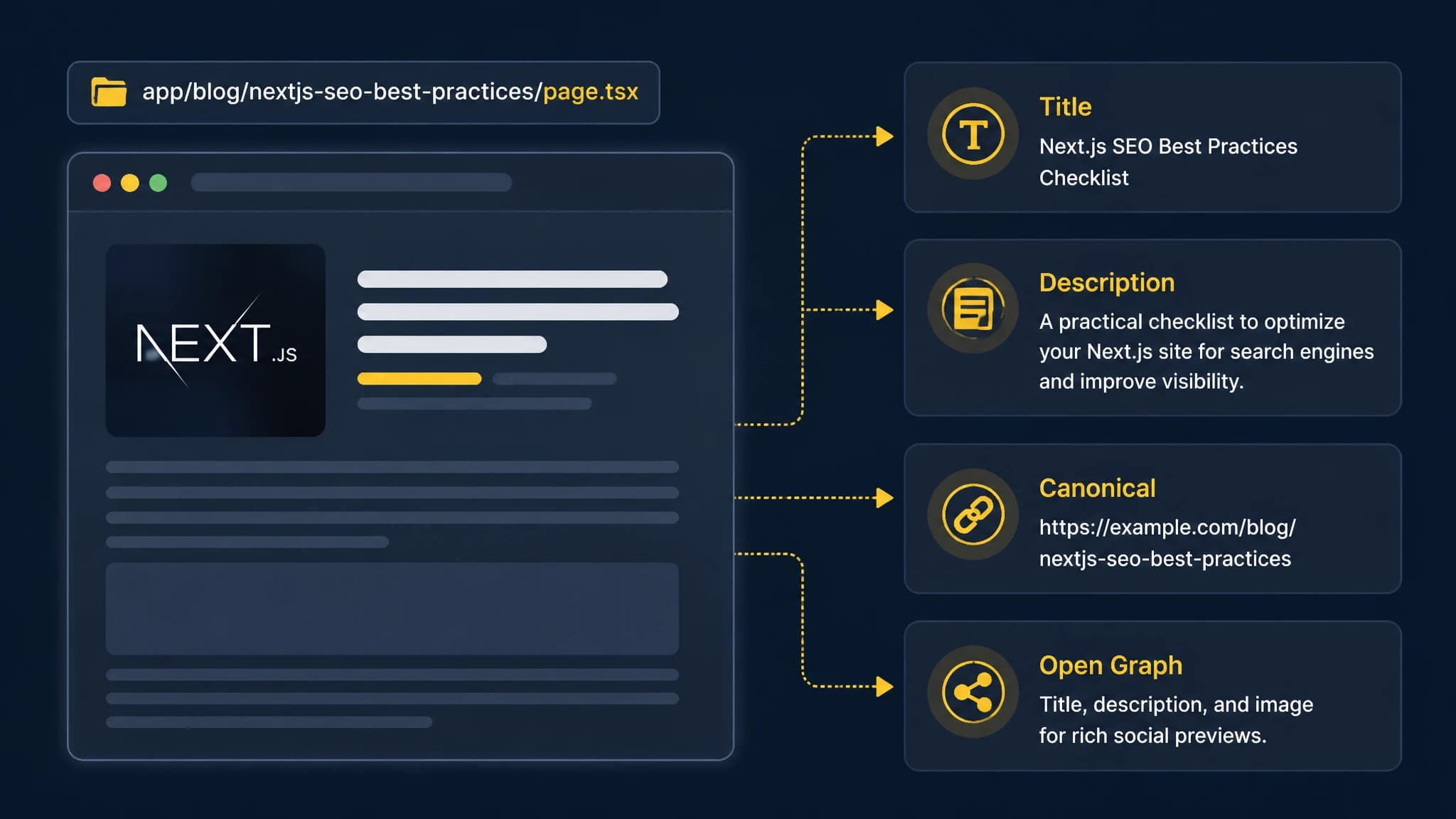
Keep page content and metadata tied to the same validated article record.
3. Set canonical URLs deliberately
Canonical URLs help communicate which version of a page should be treated as the primary one. This matters when the same content can be reached through query parameters, alternate routes, pagination variants, or changes in URL structure.
For each indexable page, define one canonical URL using the final public format. Keep the protocol, hostname, trailing-slash behavior, locale path, and route naming consistent. Do not generate canonicals from an untrusted request host unless your application validates the host first.
Google recommends setting canonical information in HTML when possible and warns against creating conflicting canonical tags through JavaScript. In a Next.js application, the Metadata API is a practical way to generate the canonical link from the same content and routing data used to render the page. (developers.google.com)
Canonical review checklist
- Does the canonical URL return a 200 status code?
- Does it point to the preferred HTTP or HTTPS version?
- Does it match the URL linked from navigation and internal content?
- Does it avoid tracking parameters?
- Is there only one canonical declaration?
- Does the canonical page contain the same intended content?
Read our Next.js metadata SEO guide for a more detailed implementation approach.
4. Use clean routes, sitemaps, and robots rules
A content-driven Next.js site should make it easy to discover its important URLs. Use short, readable slugs that describe the page topic. Avoid exposing internal database IDs when a stable editorial slug is available.
Create an XML sitemap that includes indexable pages and excludes redirects, error pages, filtered duplicates, drafts, and pages marked noindex. Next.js supports a file-based sitemap convention as well as dynamically generated sitemap responses, so choose the option that matches how often your content changes.
Your robots rules should block private or non-content areas without accidentally excluding article routes, assets, or the sitemap. Treat robots rules as crawl instructions, not as a replacement for authentication or access control.
When a new article is published, your workflow should update the sitemap source and make the URL discoverable through internal links. RankWorker can support this part of the process by helping us plan and publish content through our Next.js or API-based workflows, while your application remains responsible for rendering the final public page correctly.
5. Organize content with meaningful structure
Search engines and readers both benefit from clear document structure. Use one descriptive H1, then organize the article with H2 and H3 headings that reflect the actual questions the content answers.
For content-heavy sites, structure each article record around fields such as:
- Title and slug
- Summary or excerpt
- Body content
- SEO title and meta description
- Author information
- Publication and updated dates
- Featured image and alt text
- Category and related topics
- Optional structured data fields
Do not add structured data simply because a schema type exists. The markup should describe visible, accurate content. For example, an Article or BlogPosting object can support an editorial page when its headline, author, image, date, and publisher information match what users can see.
Also make important facts available as normal text. Do not place essential explanations only inside a visual component, canvas, or interactive widget.
6. Build internal links into the publishing model
Internal linking is easier to maintain when it is part of your content workflow rather than a last-minute editing task.
Every new article should link to at least one broader resource when one exists, and it should be considered for links from older, related pages. Use descriptive anchor text that tells readers what they will find. Avoid repeating the same exact anchor text everywhere or linking every keyword variation on the page.
A useful content relationship model includes:
- One pillar page for the broad topic
- Supporting articles for narrower questions
- Related articles connected by shared concepts
- Navigation links for categories or collections
- Breadcrumbs when they clarify the site hierarchy
For example, a Next.js SEO article might connect to guides about metadata, sitemaps, MDX, and content management. Our Next.js SEO topic collection can help you find related subjects for a content cluster.
7. Treat performance as an SEO implementation requirement
Fast pages are not created by choosing Next.js alone. Performance depends on the rendered page, JavaScript bundle, images, fonts, third-party scripts, caching, hosting, and data-fetching choices.
Start with the page experience users actually receive. Compress and size images appropriately, avoid shipping interactive JavaScript to sections that do not need it, and keep large client-side dependencies away from article templates. Use framework image tooling where it fits your setup, but still provide accurate dimensions, meaningful alt text, and an appropriate loading strategy.
Review dynamic data access carefully. In current Next.js App Router guidance, dynamic APIs and uncached data can affect rendering and caching behavior, while granular request-level caching provides more control than treating every route as entirely static or entirely dynamic. (nextjs.org)
Measure both real-user performance and lab results. At minimum, review mobile loading, layout stability, interaction responsiveness, and the amount of JavaScript required before the article is readable.
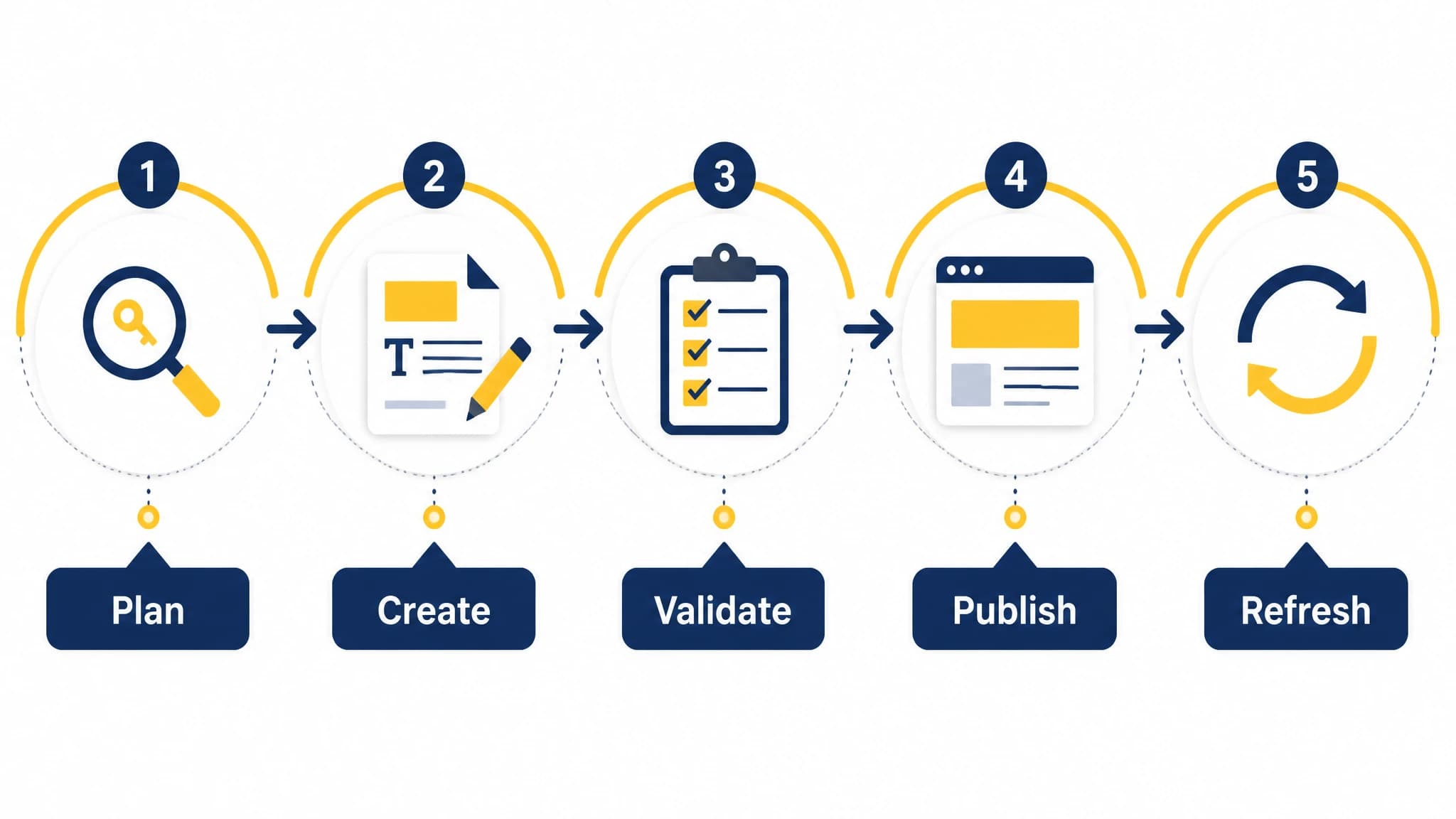
A repeatable workflow reduces the risk of publishing technically incomplete content.
8. Design a dependable publishing workflow
A technically correct page is only useful if your team can publish it consistently without creating broken URLs or incomplete metadata.
A practical workflow looks like this:
- Choose a topic and search intent.
- Map the target keyword to a specific page.
- Draft the outline and supporting questions.
- Create the article, metadata, images, and internal-link suggestions.
- Validate the slug, canonical, structured content, and status behavior.
- Preview the page using the production rendering path.
- Publish through your CMS, Next.js integration, or API.
- Confirm the live URL, sitemap inclusion, and internal links.
- Monitor indexing and update the article when the information changes.
With RankWorker, we can help automate the planning, content generation, metadata, scheduling, and publishing steps. For a Next.js site, our Next.js and API-based publishing options are most useful when they fit your existing content model and deployment process. The final quality check should still happen on the live application, because the application controls routing, rendering, caching, and delivery.
9. Test every release with an SEO checklist
Add automated checks before content or code reaches production. Tests do not replace editorial review, but they catch common failures early.
Useful checks include:
- Every indexable page has one H1.
- Titles and descriptions are present and not unintentionally duplicated.
- Canonical URLs are absolute and match the intended route.
- Drafts and private pages are not included in the sitemap.
- Missing slugs return 404 responses.
- Internal links do not point to deleted URLs.
- Images have alt text where appropriate.
- JSON-LD is valid and matches visible content.
- Published pages are reachable from at least one relevant internal path.
- A build or deployment does not silently remove existing URLs.
Run a crawl against a staging environment when possible, then verify a sample of live pages after deployment. Pay special attention to templates that recently changed, because a single layout or metadata mistake can affect many URLs at once.
A final Next.js SEO checklist
Before you consider a content-driven Next.js website search-ready, review the whole system rather than only the page component:
- Rendering: Is the main content available in the initial rendered output?
- Metadata: Does every page have unique, accurate metadata?
- Canonicalization: Is one preferred URL declared and linked consistently?
- Discovery: Are important pages in the sitemap and connected by internal links?
- Structure: Are headings, content fields, and structured data meaningful?
- Performance: Are images, JavaScript, fonts, and data requests controlled?
- Publishing: Can your team move from keyword to live URL without manual gaps?
- Maintenance: Can you update, redirect, refresh, and validate content safely?
Next.js provides strong building blocks for SEO, but the result depends on implementation discipline. When crawlable content, metadata, routing, performance, internal linking, and publishing operations work together, your website is better prepared to serve both search engines and readers.