

 Veselin Stoyanov13 min read
Content Automation Tools: What to Automate in SEO Publishing
Learn what to automate in an SEO publishing workflow, from research and briefs to article generation, images, metadata, scheduling, and publishing.

Content Automation Tools: What to Automate in an SEO Publishing Workflow
The best content automation tool does not simply produce a blog post. It helps move a topic from search research to a useful, optimized, scheduled, and published article with fewer manual handoffs.
That distinction matters. Many tools focus on one task, such as AI writing or keyword research. A practical SEO publishing workflow has more stages: finding opportunities, grouping related topics, creating briefs, generating articles, preparing images and metadata, scheduling content, and publishing it correctly.
The right approach is to evaluate automation by workflow stage rather than by headline claims about speed or output volume. Automate repetitive production work, but keep people responsible for strategy, factual accuracy, brand standards, and final approval.
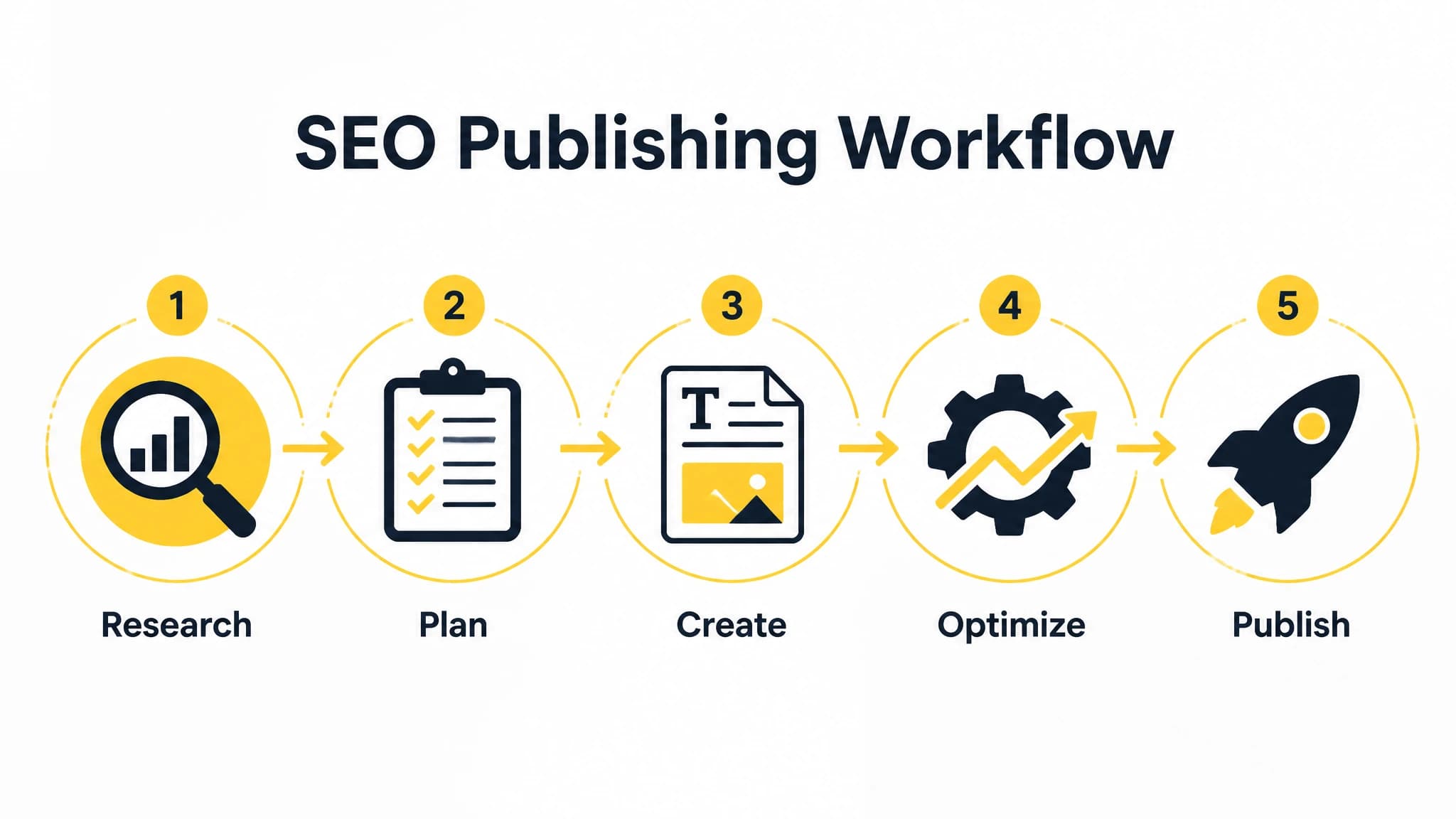
Evaluate content automation by how well it connects research, planning, creation, optimization, and publishing.
What is a content automation tool?
A content automation tool is software that helps automate repeatable tasks in the content production process. Depending on the platform, it may support keyword research, content planning, article creation, SEO metadata, images, scheduling, publishing, or several of these steps in one workflow.
For SEO teams and busy business owners, the main benefit is not just writing faster. It is reducing the number of disconnected tasks required to publish consistently. A reliable system should help answer questions such as:
- Which topics are worth creating next?
- How do related keywords fit into a content cluster?
- What should each article cover?
- Which production steps can happen automatically?
- Where does human review still matter?
- How will the article reach the website on schedule?
This is why AI blog automation software should be judged as an operating workflow, not only as a text generator.
The eight stages to evaluate in an SEO publishing workflow
A useful evaluation framework starts with the complete path from opportunity to publication. Review each stage separately, then assess whether the tool connects them into one repeatable process.
1. Keyword research and content opportunities
The workflow begins with finding relevant search opportunities. A tool may help identify keywords, related queries, or topics that deserve coverage. The important question is whether the research supports a business goal and a realistic content plan.
Look for capabilities that help you:
- Discover terms related to your products, services, or audience.
- Separate broad topics from specific questions.
- Identify opportunities that can become useful articles.
- Record target keywords and their intended purpose.
- Turn research into planned content rather than a disconnected keyword list.
Automation is helpful when research would otherwise happen in spreadsheets, browser tabs, and scattered notes. However, a tool should not be treated as the final authority on what your business should publish. Your audience, expertise, differentiation, and commercial priorities still determine whether a topic is worthwhile.
2. Content clustering and topic organization
A single keyword rarely represents an entire SEO strategy. Related topics often need to be organized into clusters so your site can build depth around an important subject.
A content automation tool can help group related keywords and identify relationships between a broader topic and supporting articles. This makes it easier to see whether your plan is balanced or whether you are repeatedly targeting nearly identical ideas.
When evaluating clustering features, ask whether you can understand:
- The main topic or pillar page.
- Supporting articles and related questions.
- Potential overlap between planned posts.
- Gaps in the current content library.
- Which articles should link to one another.
Clustering should improve editorial decisions, not force every topic into an artificial structure. Human judgment is still needed to decide whether two queries deserve separate pages or one comprehensive resource.
For a broader look at how research, planning, writing, optimization, and publishing fit together, see our SEO content automation guide.
3. Content briefs and article planning
A strong brief gives an article a clear job before generation begins. It can include the primary keyword, related terms, search intent, audience, suggested structure, internal linking opportunities, and important points to cover.
Brief automation is valuable because it creates consistency across articles. Without a repeatable briefing step, writers or AI systems may produce content that is polished but misaligned with the searcher’s question.
A useful brief should clarify:
- The reader’s likely goal.
- The main question the article must answer.
- The article’s scope and boundaries.
- Recommended headings or subtopics.
- Supporting keywords and concepts.
- The desired next step for the reader.
Do not confuse a long brief with a good brief. The goal is to provide enough direction for a focused article without adding unnecessary complexity.
4. Article generation
Article generation is the most visible part of many AI content tools, but it should not be the only evaluation criterion. A generated draft is useful when it follows the brief, answers the intended question, and gives an editor a practical starting point.
Assess article generation based on:
- Alignment with the target keyword and search intent.
- Ability to follow a defined structure.
- Readability and organization.
- Control over tone, audience, and scope.
- The amount of editing required before publication.
- Whether the draft avoids unsupported claims and generic filler.
The strongest workflow does not treat generated content as automatically publishable. It uses automation for the first production pass while preserving review for accuracy, originality, brand voice, and usefulness.
With RankWorker, we connect keyword planning, content opportunities, clustering, planning, and article generation so the draft is created within a defined SEO workflow rather than as an isolated prompt.
5. Image generation and visual preparation
Images are easy to overlook because they often happen after the article is written. In practice, preparing a relevant cover image or supporting visual can add another manual handoff to every post.
When reviewing image automation, consider whether the tool helps you create visuals that match the article’s concept and placement. Useful options may include editorial photography, diagrams, process illustrations, comparison graphics, or other formats that improve comprehension.
The right image depends on the section. A process article may benefit from a workflow diagram. A practical guide may need an annotated illustration. A general business article may be better served by an editorial lifestyle image.
Automation should reduce production friction, not encourage decorative images that do not help the reader. Every visual should support the topic, improve scanning, or clarify an idea.
6. SEO metadata
Metadata is a small part of the publishing process, but it is repeated for every article. A content automation tool can help prepare titles, meta descriptions, slugs, and other fields alongside the article.
Good metadata should be:
- Accurate to the article.
- Clear about the reader benefit.
- Written for humans, not stuffed with keywords.
- Consistent with the page’s search intent.
- Distinct from other pages on the site.
Automated metadata is a useful starting point, but review is still important. A title that sounds attractive but promises something the article does not deliver can create a poor search experience.
7. Scheduling and editorial operations
Publishing consistently becomes difficult when every article requires manual coordination. Someone must decide when the post goes live, check whether the draft is ready, and remember which articles are next in the queue.
Scheduling tools help turn a list of ideas into an editorial operation. Look for the ability to organize planned content, assign timing, and see what is ready, pending, or scheduled.
A practical publishing calendar should make it easy to answer:
- What is planned for the next few weeks?
- Which articles are ready for review?
- Which posts are waiting for images or metadata?
- Are related topics spaced sensibly?
- Is the publishing pace realistic for the team?
Scheduling is especially useful for solo founders and small teams because it separates content planning from the moment of publication.
8. Publishing and website delivery
The final stage is getting the approved article onto the website correctly. This may involve formatting, metadata fields, images, categories, scheduling settings, and publication status.
A content automation tool should be evaluated by how well it fits your technical setup. Depending on your website and workflow, relevant delivery options may include WordPress, Next.js, a direct API, webhooks, IndexNow, or an MCP Server.
The key is not to collect integrations for their own sake. Choose a workflow that reduces manual copying and makes the handoff predictable. If your team uses an AI agent, an MCP server can also provide a way to interact with the content workflow through a compatible tool while retaining the platform’s supported functions.
Before automating publication, define a quality gate. Decide which articles can publish automatically, which require approval, and which checks must always happen before a page goes live.
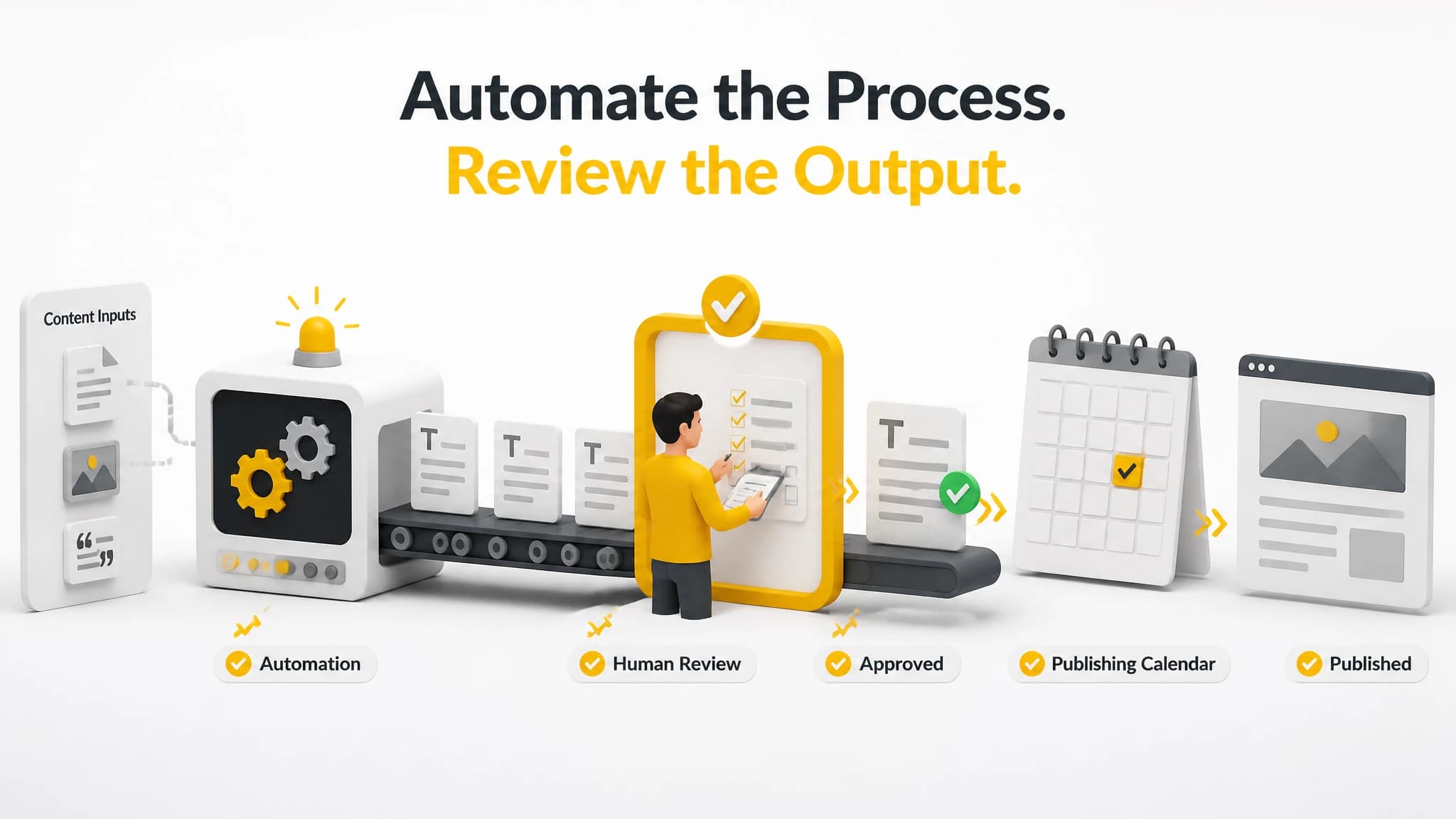
Automation should handle repeatable work while people retain control over accuracy and editorial standards.
What should you automate first?
If your current process is mostly manual, do not automate everything at once. Start with the steps that are repetitive, clearly defined, and easy to review.
A sensible order is:
- Content planning: Create a consistent queue of topics and target keywords.
- Brief creation: Standardize article goals, structure, and coverage.
- Metadata preparation: Draft titles, descriptions, and slugs alongside the article.
- Image preparation: Generate or organize relevant visuals.
- Scheduling: Put approved content into a predictable publishing calendar.
- Publishing: Connect the workflow to your website after quality checks are established.
Research and strategy should be automated carefully because poor inputs can create a large amount of low-value output. Likewise, final approval should remain under human control until your standards and review process are reliable.
What should not be fully automated?
Automation is not a replacement for responsibility. Keep human ownership over decisions that affect accuracy, trust, positioning, and customer experience.
These areas usually need review:
- Whether the topic is strategically relevant.
- Whether claims are accurate and supportable.
- Whether examples fit the audience.
- Whether the article reflects your brand and expertise.
- Whether the content overlaps with an existing page.
- Whether the final call to action is appropriate.
- Whether the page is ready for publication.
The goal of blog automation is not to remove every decision. It is to reserve human attention for decisions that matter while software handles repeatable production work.
How to compare content automation tools
Use a workflow scorecard instead of comparing tools only by word count, generation speed, or the number of templates available.
Workflow coverage
Does the platform support the stages you actually need, from research and planning through publishing? A writing-only tool may still be useful, but it will not solve scheduling or website delivery problems.
Control and review
Can you inspect the brief, edit the draft, adjust metadata, review images, and approve publication? Automation should make review easier, not hide the steps that affect quality.
Integration fit
Does the tool connect with your website and existing systems? Consider whether your workflow needs WordPress, Next.js, direct API access, webhooks, IndexNow, or an MCP Server.
Repeatability
Can you use the same process for the next ten or fifty articles? A workflow that works only when one expert manually supervises every step is not genuinely scalable.
Editorial safety
Can you set standards for topics, tone, review, and publication? The more content you automate, the more important these controls become.
Business usefulness
Does the workflow help you publish content connected to your audience and business goals? Traffic alone is not enough. The content should attract the right readers and guide them toward a useful next step.
Our SEO automation software guide provides another way to think about these evaluation criteria, especially when comparing connected workflows with collections of individual tools.
A practical implementation checklist
Before choosing or configuring a content automation tool, document your current process. Write down every step from selecting a keyword to publishing the article. Include the people, tools, approvals, and handoffs involved.
Then mark each step as one of three types:
- Automate: Repetitive work with clear inputs and outputs.
- Assist: Work where software can prepare a draft but a person should decide.
- Own: Strategic or quality-sensitive decisions that require human judgment.
For example, metadata drafting may be automated or assisted. Topic selection may be assisted. Accuracy review should remain owned by a qualified person.
Next, create a small pilot. Use a limited group of articles to test whether the workflow produces useful drafts, accurate metadata, relevant images, and dependable website delivery. Track how much editing is required and where errors occur.
Only expand the workflow after the quality gates are clear. More automation amplifies both good processes and bad ones.
The best content automation tool is a connected workflow
A content automation tool is most valuable when it connects the stages that usually happen in isolation. Research should inform planning. Planning should shape the brief. The brief should guide generation. Metadata, images, scheduling, and publishing should follow without unnecessary manual rework.
For busy founders, website owners, and small SEO teams, this connected approach can make consistent publishing more practical. It does not eliminate the need for strategy or review. Instead, it gives those decisions a better place in the process.
With RankWorker, we focus on the full SEO publishing workflow: keyword planning, research, content opportunities, clustering, article planning, generation, images, metadata, scheduling, and automated publishing. Use the stages that fit your operation, keep the quality controls that matter, and automate progressively as the process proves reliable.
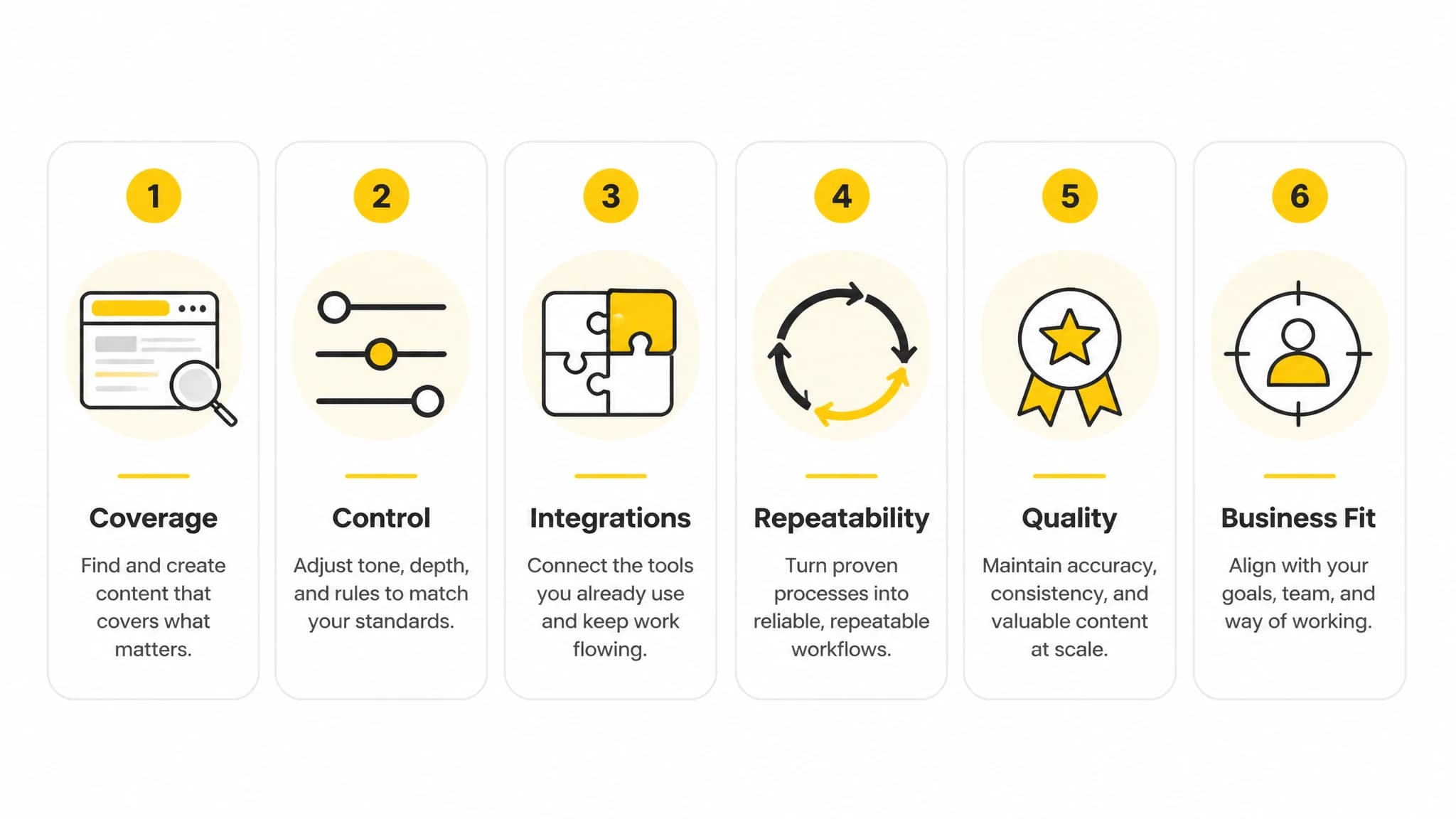
A workflow scorecard helps you compare tools by practical usefulness instead of headline claims.