

 Veselin Stoyanov13 min read
SEO Automation Software: A Practical Guide to Automating Your SEO Workflow
Learn how SEO automation software streamlines research, planning, content creation, optimization, and publishing without sacrificing editorial control.

SEO automation software helps turn SEO from a collection of disconnected tasks into a repeatable operating system. Instead of manually researching keywords, planning topics, writing briefs, preparing metadata, creating images, uploading articles, and scheduling posts, you can connect those steps into one controlled workflow.
The important distinction is that useful automation does not mean publishing everything an algorithm produces. The best approach automates repetitive work while preserving human control over strategy, accuracy, brand voice, and final approval.
This guide explains what SEO automation software does, which parts of the workflow are safe to automate, where shortcuts create risk, and how small businesses and busy founders can build a practical system.
What is SEO automation software?
SEO automation software is a platform or collection of tools that uses rules, data, artificial intelligence, and integrations to reduce manual work across the SEO process.
Depending on the platform, automation may support tasks such as:
- Keyword research and opportunity discovery
- Topic grouping and content clustering
- Content planning and editorial calendars
- Article briefs and draft generation
- SEO titles, descriptions, and metadata
- Image creation and asset preparation
- Scheduling and automated publishing
- Connections to a CMS or website through integrations
The goal is not simply to create more content. The goal is to make good SEO work easier to repeat consistently.
For example, a manual process may require a founder to move information between a keyword tool, spreadsheet, writing application, image generator, and WordPress dashboard. An automated workflow can keep those steps connected, reducing handoffs and making it easier to see what happens next.
What SEO automation should and should not do
Automation is most valuable when it handles predictable, repetitive, or time-consuming work. It becomes risky when it replaces judgment that depends on business context or subject expertise.
Good candidates for automation
These activities are usually suitable for automation when the inputs and quality checks are clear:
- Collecting and organizing keyword ideas
- Identifying related content opportunities
- Grouping topics into clusters
- Creating a content calendar
- Generating first-draft outlines
- Preparing article drafts from approved topics
- Producing metadata suggestions
- Creating a consistent image brief or article image
- Scheduling approved content
- Publishing through a configured website integration
Tasks that still need editorial control
A reliable system should leave room for human review of:
- Search intent and business relevance
- Claims that require verification
- Accuracy in technical, financial, legal, or health-related content
- Brand positioning and differentiated insights
- Internal links and conversion paths
- Whether a topic is genuinely useful to the intended reader
- Final publication readiness
Automation should reduce the cost of judgment, not eliminate judgment altogether.
The SEO workflow to automate
A practical SEO automation system follows the same sequence as a strong manual process. Each stage should produce a useful input for the next stage.
1. Find and qualify search opportunities
Start with opportunities that match both search demand and your business. A keyword is not automatically valuable because it has traffic potential. It should also connect to a problem your audience has, a product category you serve, or a question your business can answer credibly.
Useful qualification questions include:
- Does this topic match our audience?
- What does the searcher actually want to accomplish?
- Can we provide a more useful answer than existing results?
- Does the topic support a relevant product, service, or next step?
- Is it distinct from content we already have?
SEO automation software can help organize research and surface content opportunities, but you should define the strategic filters before generating a large list of topics.
2. Group related topics into clusters
Content clustering helps prevent a website from publishing isolated articles with no clear relationship. A cluster normally includes a broad topic page supported by narrower articles that answer specific questions.
For example, a small business selling project management software might organize content around a central project management topic, with supporting articles about project planning, task prioritization, team workflows, and reporting.
Automation can make clustering faster by grouping related keywords and identifying overlaps. You still need to check whether the proposed structure makes sense for your audience and whether multiple keywords should be addressed on one page instead of several.
3. Create a realistic content plan
A content plan turns opportunities into scheduled work. It should make clear:
- Which topic will be published
- Who the article is for
- What search intent it serves
- Which supporting pages it should connect to
- What action the reader can take next
- When the article should be reviewed or published
Avoid building a calendar based only on volume. A smaller list of well-connected topics is easier to maintain and more likely to create a coherent resource for readers.
This is where content automation guidance can help you think beyond article generation and design the complete process from research through publication.
4. Generate a useful article brief
An article brief gives the writing stage direction. At minimum, it should define the primary keyword, audience, search intent, important subtopics, recommended structure, internal-link opportunities, and the reader’s likely next step.
A good brief prevents generic writing. It also makes review easier because you can compare the draft against a clear objective.
SEO automation software can generate a starting brief from research data. Before writing begins, check that the brief reflects your business, avoids duplicated topics, and does not make unsupported promises.
5. Draft and optimize the article
Automated drafting can reduce the time required to produce a first version, especially for repeatable formats such as tutorials, checklists, comparisons, and process explainers.
The draft should still be evaluated for:
- Clear answers near the beginning
- Logical heading structure
- Specific examples and practical steps
- Natural use of the target keyword
- Accurate explanations
- Appropriate reading level
- Original perspective or useful synthesis
- A conclusion that helps the reader decide what to do next
Optimization should support the reader rather than turn the article into a list of repeated phrases. Search engines and readers both benefit from clear language, useful structure, and content that satisfies the underlying question.
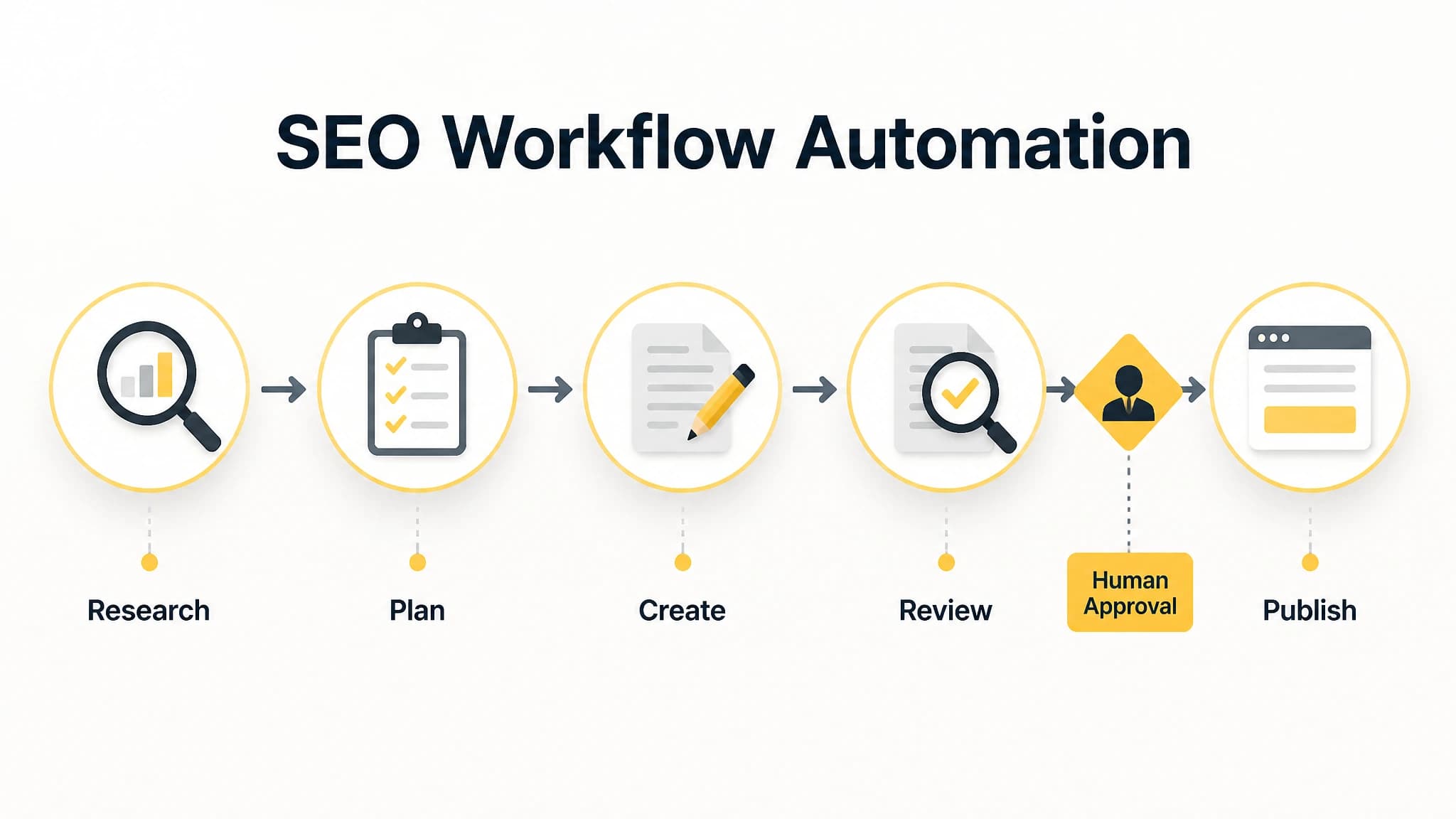
Automate repeatable production steps, but keep a human approval checkpoint before publishing.
6. Prepare metadata and article assets
SEO metadata is a small part of the workflow, but it is easy to overlook when publishing manually. Prepare a concise title tag, meta description, URL slug, featured image, and any relevant inline visuals before the article reaches the publishing queue.
Metadata should accurately describe the page. Do not promise a result the article does not deliver, and do not force the primary keyword into every field.
For practical articles, relevant visuals can improve comprehension. A process diagram showing the path from research to publishing may be more useful than a generic stock image. Choose assets based on the section’s purpose, not simply because every article needs more images.
7. Review before scheduling
A review gate is one of the most important parts of SEO workflow automation. Before an article is scheduled, use a checklist that covers both quality and risk.
A useful pre-publication checklist includes:
- The article matches the intended search intent
- The introduction answers the main question directly
- Claims are accurate and appropriately qualified
- Headings describe the content that follows
- Internal links are relevant and functional
- Metadata matches the article
- Images have descriptive alternative text
- The call to action fits the topic
- Formatting works correctly in the destination CMS
- The article does not duplicate an existing page
The more automated your publishing process becomes, the more valuable a consistent review checklist is. Automation increases throughput, so a weak quality gate can also increase the number of problems reaching your website.
8. Schedule and publish automatically
Once an article is approved, scheduling removes another repetitive handoff. A connected workflow can send the article, metadata, images, and publication timing to your website or CMS.
With RankWorker, we support content scheduling and automated publishing alongside planning, article generation, images, and SEO metadata. Our WordPress integration is useful for website owners who want approved content to move from the production workflow to their site without repeated manual uploading.
Automated publishing should be configured carefully. Confirm the correct author, category, status, featured image, URL structure, and publication time before allowing a workflow to run unattended.
Where SEO automation creates the most value
The strongest return usually comes from reducing friction between tasks rather than automating only one isolated activity.
For example, an article generator may save time during drafting, but you can lose that benefit if someone still has to copy the topic into a spreadsheet, rewrite the brief, create metadata separately, prepare an image, upload the article, and schedule it by hand.
A connected workflow can reduce these repeated transitions. That matters particularly for:
- Solo founders managing marketing alongside operations
- Small businesses without a dedicated SEO team
- Agencies managing multiple content calendars
- Website owners publishing consistently across a growing library
- Teams that have a strategy but struggle with execution capacity
Our approach with RankWorker is to connect keyword planning, research, content opportunities, clustering, planning, generation, metadata, images, scheduling, and publishing where those capabilities fit the workflow. You can use the system to reduce manual production work while keeping decisions about topics, quality, and approval under your control.
How to choose SEO automation software
When comparing tools, evaluate the workflow rather than a single feature such as AI writing. Ask whether the platform supports the full path from opportunity to published page.
Look for workflow coverage
A useful platform should support the stages you actually struggle with. If research is your bottleneck, prioritize opportunity discovery and planning. If publishing is slow, look for scheduling and CMS integrations. If content quality is inconsistent, prioritize briefs, review controls, and clear workflow stages.
Check how much control you retain
You should be able to approve topics, adjust plans, edit drafts, review metadata, and decide what gets published. A system that makes it difficult to intervene may create more operational risk than it removes.
Evaluate integration options
Your publishing environment matters. Depending on your technical setup, you may need WordPress, Next.js, a direct API, webhooks, IndexNow, or another connection method. Choose software that fits the way your website is built instead of forcing your team into an inconvenient process.
Consider repeatability
A tool is more useful when it helps you run the same quality process every week. Look for shared workflows, content planning, scheduling, reusable review steps, and visibility into what is planned, in progress, approved, and published.
For a broader comparison framework, our guide to AI SEO software explains why content generation alone is not enough when evaluating an SEO platform.
Avoid unsupported promises
Be cautious of software that guarantees rankings, instant traffic, or fully hands-off SEO results. Rankings depend on competition, content quality, technical factors, links, authority, search behavior, and ongoing changes. Good automation improves execution and consistency, but it cannot guarantee a specific outcome.
A simple implementation plan
You do not need to automate everything on the first day. Start with one repeatable content workflow.
- Choose one audience and one topic area.
- Define the business outcome the content should support.
- Create a shortlist of relevant keyword opportunities.
- Group overlapping topics and remove duplicates.
- Build a small publishing plan.
- Create a review checklist before generating drafts.
- Automate the repetitive production steps.
- Publish only after human approval.
- Review performance and update the workflow when problems appear.
Start with a manageable publishing cadence. Once the process is reliable, expand the topic set or increase output. The objective is a system your business can maintain, not a temporary burst of activity.
You can also use this automated content workflow as a practical reference when documenting each stage, owner, input, and approval point.
Common SEO automation mistakes
Automating before defining the strategy
If you do not know who the content is for or which topics matter, automation simply produces work faster. Establish audience, intent, topic boundaries, and business relevance first.
Treating every keyword as a separate article
Related keywords often belong on the same page. Creating multiple thin pages can make the site harder to navigate and may create internal competition.
Removing the review step
A draft can be fluent and still be inaccurate, generic, or poorly aligned with your offer. Keep a review gate, especially for claims and topics that require expertise.
Measuring output instead of outcomes
The number of articles published is an operational metric, not proof of success. Track whether content earns relevant visibility, supports qualified visits, generates leads, or helps readers move toward a useful next step.
Publishing without maintenance
SEO content needs review as products, customer questions, search results, and business priorities change. Build refreshing and consolidating into the workflow rather than treating publication as the final step forever.
Final takeaway
SEO automation software is most effective when it connects the entire workflow instead of promising effortless rankings or unlimited articles. Use automation for research organization, clustering, planning, drafting, metadata, images, scheduling, and publishing, then reserve human attention for strategy, accuracy, quality, and approval.
For busy founders, solo founders, and small businesses, that balance can make SEO more sustainable. You do not need to remove people from the process. You need to remove unnecessary manual handoffs so your team can consistently produce useful content.
With RankWorker, we help you build that connected workflow from keyword opportunity through publication, while keeping editorial control where it matters.