

 Veselin Stoyanov11 min read
Content Decay: How to Spot Articles Losing Traffic and Bring Them Back
Learn how to find content decay in Search Console, diagnose traffic drops, and decide whether to refresh, merge, redirect, or leave a page alone.

A once-useful article can gradually lose search visibility, clicks, and relevance. That pattern is called content decay. To address it, compare a page’s performance with a comparable earlier period, inspect the queries behind the change, and then decide whether the page needs a refresh, a merge, a redirect, or no action.
A traffic decline alone is not proof that an article needs rewriting. Search demand can change, results can fluctuate, and some pages are seasonal. The aim of a content audit is to find pages with a meaningful decline and a fixable reason behind it - then make the smallest useful change.
What is content decay?
Content decay is a sustained decline in a page’s organic search performance over time. You might notice fewer clicks, fewer impressions, weaker rankings for important queries, or a mix of these signals.
Use Search Console to examine Google Search performance. Its Performance report includes clicks, impressions, click-through rate (CTR), and average position, and lets you view data by page and query. Treat the report as evidence to investigate, not as a verdict about why performance changed. (support.google.com)
Not every drop calls for an update. A page with fewer clicks but steady impressions may have a search-result presentation or CTR issue. A page losing impressions across its key queries may have lost visibility, seen reduced demand, or no longer match what searchers want. Each pattern calls for a different diagnosis.
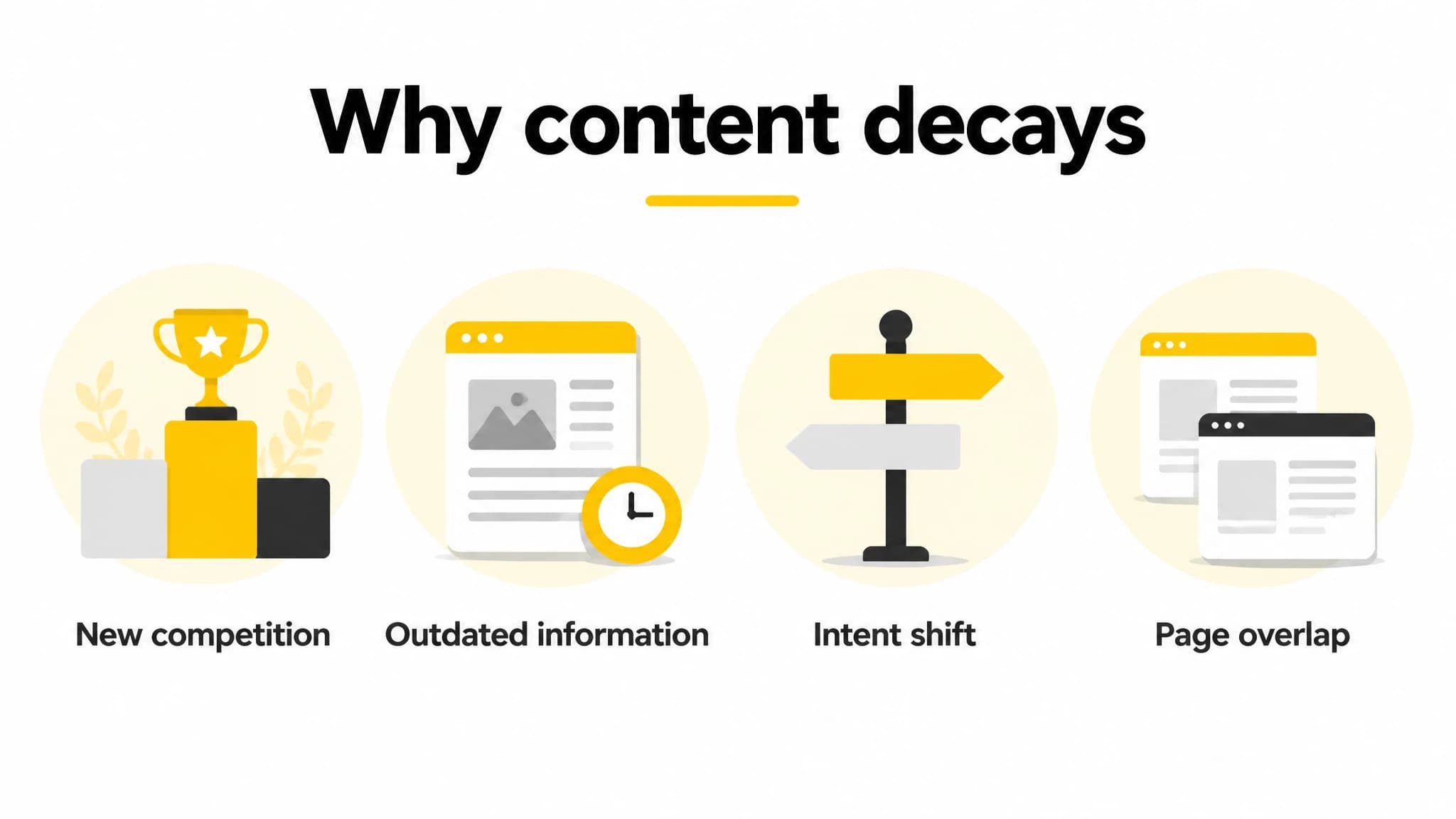
A traffic decline can have several causes, so diagnose before editing.
Why do articles lose organic traffic?
Look for a cause before editing. Content decay often has one or more of these explanations:
- New competition: Other pages may now answer the query more clearly, cover important details, or better satisfy what searchers need.
- Outdated information: Advice, examples, screenshots, product details, or references may no longer be accurate. Readers may find more current sources useful.
- A shift in search intent: The query may now call for a different format or answer. A guide that once fit an informational query may no longer match the results people see.
- Cannibalization: Multiple pages on your site may be relevant to the same query. Search Console can help you see whether more than one of your URLs appears for it, but you still need to review those pages to decide whether they overlap.
- A change that is not content decay: Seasonality, temporary demand changes, or a technical problem can also affect clicks. Check the scope and timing of a decline before rewriting a page.
How to find content decay in Google Search Console
Use the Performance report for Search results. Compare equivalent periods, then check both the page and its queries. A useful comparison could be the latest complete three months against the same three months a year earlier. For less seasonal topics, comparing a recent period with the previous period of equal length can also help. Use complete periods and avoid drawing conclusions from a few unusually strong or weak days.
1. Start with the page
Open the Search results Performance report, select a date comparison, and choose a reasonable period for your site’s traffic and topic. Go to the Pages table and find the article URL. Compare clicks and impressions first. Use CTR and average position as clues, not as standalone proof of a problem.
Look for a sustained decline rather than a small difference. If possible, compare weekly or monthly trends so that day-to-day variation does not dominate your assessment. Search Console supports comparisons between date ranges and lets you inspect performance by pages and queries. (support.google.com)
2. Open the page’s query data
Filter the report to the page URL, then open the Queries table. Compare which queries gained or lost impressions and clicks. Ask:
- Are the page’s most important queries losing impressions, clicks, or both?
- Are formerly relevant queries now showing different wording or needs?
- Is the page receiving impressions for queries it barely addresses?
- Are several URLs on your site appearing for the same valuable query?
A page-level decline may hide very different query-level patterns. One topic could be falling while a related query is growing. That is why reviewing only the total clicks can lead to the wrong edit. Search Console’s report allows you to filter by page and inspect queries associated with the selected data. (support.google.com)
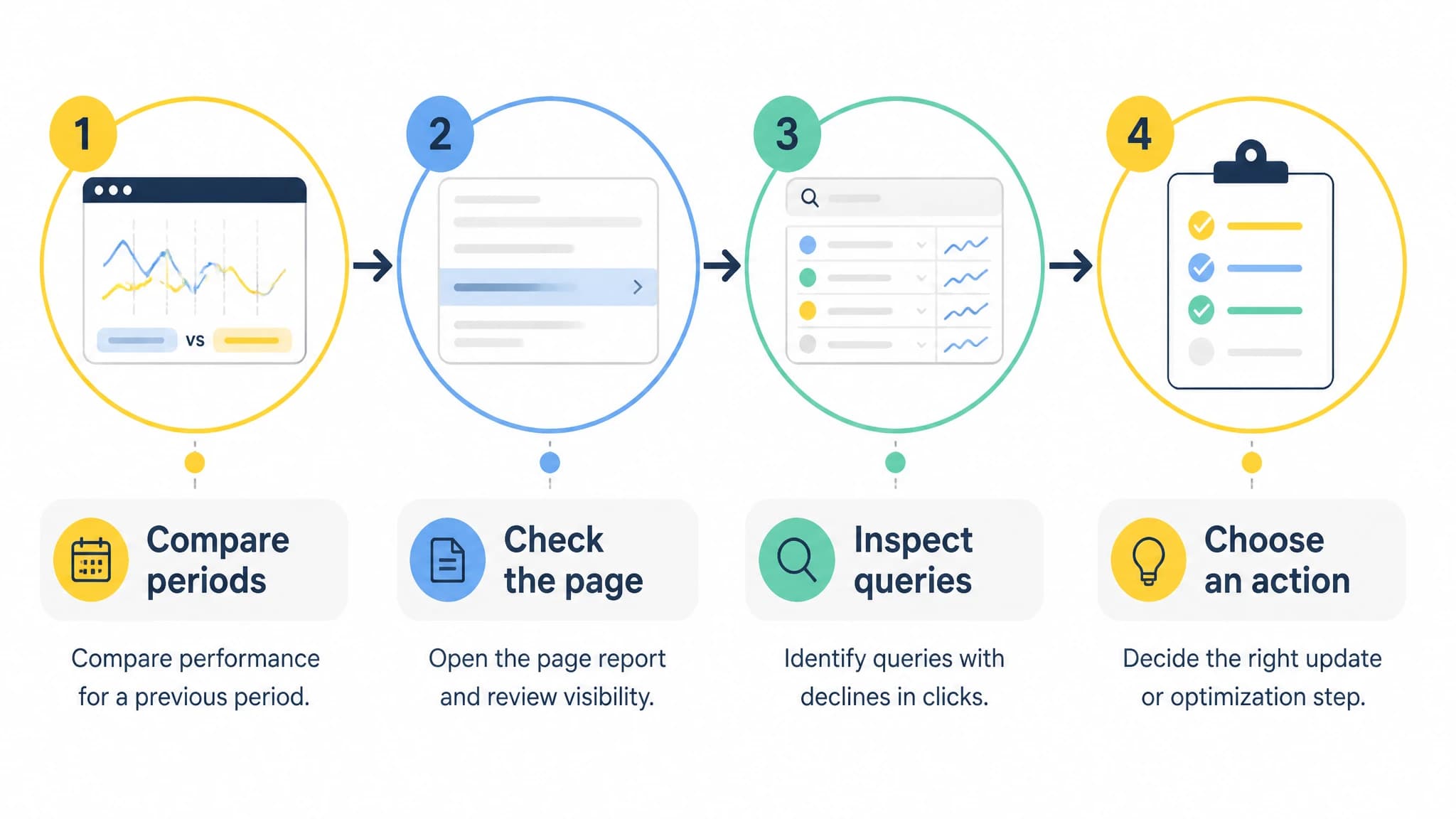
Review page and query trends before deciding what to change.
3. Check whether the decline has another explanation
Before changing the article, confirm that you are comparing equivalent search types, countries, devices, and time periods. Check whether the trend affects one page or many pages. If a whole group of URLs drops at once, investigate site-wide or technical causes before treating each article as a separate content problem.
Also check that the data is recent enough to interpret. Search Console reporting can include preliminary recent data, and its date reporting uses Pacific Time outside the 24-hour view. Avoid making a major decision from an incomplete reporting period. (support.google.com)
4. Review the live search results and the page itself
Search the important queries and inspect the current results. What kind of answer do they emphasize? Are they guides, comparisons, product pages, or something else? Then read your article from a visitor’s perspective. Check that its title, opening, structure, and depth match the need you want it to serve. This review helps distinguish outdated information from a shift in intent or stronger competition.
If you want a related walkthrough for finding pages with visibility and room to improve, see our Search Console optimization guide.
Content refresh checklist
When the evidence points to a page that still deserves to exist, refresh it to make it more useful and accurate - not simply to make it look new.
- Confirm the page’s purpose: Write down the reader, the main question, and the queries the page should serve.
- Verify claims and details: Check dates, facts, examples, tools, and instructions. Remove or correct material that is no longer reliable.
- Match the current intent: Adjust the introduction and structure if searchers now need a different kind of answer.
- Fill real gaps: Add useful explanations or steps only where they help the reader. Avoid padding the page or adding keywords without a reason.
- Improve the result preview: If impressions remain but CTR has weakened, review whether the title and description clearly reflect the page’s value.
- Resolve overlap: If another URL covers the same subject, decide whether each page has a distinct purpose or whether they should be consolidated.
- Check links and usability: Repair broken references, update relevant internal links, and make sure the content is easy to scan.
- Record the change: Note the URL, edit date, reason for the update, and baseline metrics. Recheck after a meaningful period rather than reacting to daily movement.
For teams reviewing many pages, this can become repetitive. With RankWorker, our Google Search Console integration can flag declining articles and propose revisions for your review. Use those suggestions as a starting point: confirm the diagnosis and approve only changes that improve the page for its readers.
Refresh, merge, redirect, or leave it alone?
The right decision depends on whether the page still serves a distinct purpose and whether its decline has an actionable cause.
| Choose this action | When it fits | What to do |
|---|---|---|
| Refresh | The page is still relevant, but parts are outdated, incomplete, or mismatched to current intent. | Update the specific sections, details, or framing that need attention. Keep useful material that still serves the reader. |
| Merge | Two or more pages cover substantially overlapping needs, and one stronger page can serve them better. | Combine the distinct useful material into the best destination. Check links pointing to the old pages and make the destination clear. |
| Redirect | A page has no continuing purpose of its own, but another relevant page is a suitable destination. | Redirect the retired URL to the closest genuinely relevant page. Do not send unrelated pages to a generic destination just to preserve a URL. |
| Leave it alone | The decline is small or temporary, demand is seasonal, the page still meets its purpose, or the evidence does not suggest a useful edit. | Record the observation and revisit it after more comparable data is available. |
Do not merge or redirect pages just because their traffic fell. If two pages serve different needs, keep them distinct and improve the page that has a fixable issue. If you cannot identify a clear reader benefit from an edit, waiting and monitoring may be the more responsible choice.
Measure the refresh without overreacting
Save a baseline before publishing changes: page URL, date range, key queries, clicks, impressions, CTR, and average position. Note exactly what changed and when. Later, compare an equivalent period and look at the page and query trends together.
Search performance can move for reasons beyond an edit, including changes in demand and other pages in the results. A positive or negative movement after publication does not by itself prove that the refresh caused it. Compare periods carefully and look for a pattern that fits the change you made. If the page does not improve, revisit the diagnosis rather than repeatedly rewriting it without a hypothesis.
A repeatable content audit can be simple: find a potential decline, diagnose the page and its queries, choose an action, record the update, then review again. RankWorker can help streamline this review workflow by surfacing Search Console insights and proposed revisions for approval, while you decide which changes make sense.
Bring declining pages back with a clear reason
Content decay is a signal to investigate, not an instruction to rewrite. Compare comparable periods in Search Console, inspect what changed at the query level, and check whether the page still matches the needs it was meant to serve. Then choose the smallest suitable next step: refresh, merge, redirect, or leave the article alone.
A careful content refresh protects what already works while fixing what no longer does. Keep a record of your decision, measure the result over a reasonable period, and make future updates based on evidence rather than a traffic dip alone.