

 Veselin Stoyanov11 min read
How to Scale SEO Content Production Without Expanding Your Team
Learn how to scale SEO content production with capacity planning, repeatable processes, quality checks, and automation. Build a sustainable workflow with your current team.

Scaling SEO content production without expanding your team starts with finding where work gets stuck, then making repeatable tasks easier to complete. Set a realistic publishing capacity, standardize handoffs and quality checks, and automate routine work only where it reduces friction. Keep people responsible for topic choices, accuracy, and the final editorial decision.
The goal is not to publish as much as possible. It is to build a process that can handle more useful work without creating an unmanageable review queue or lowering the standard of what you publish.
Start with the actual bottleneck
Before adding tools or increasing your publishing target, map the journey from a potential search topic to a published article. List each stage, the person responsible, the output needed to move forward, and any waiting time or rework.
A simple map might include:
- Finding and validating a search opportunity
- Grouping related topics and choosing priorities
- Preparing an outline or brief
- Drafting and creating supporting images
- Reviewing facts, usefulness, and brand fit
- Adding metadata, scheduling, and publishing
Then look at recent work and ask where items most often pause. If writers wait for topic approval, more drafting capacity will not fix the delay. If articles pile up in editing, increasing drafts may make the queue worse. If publishing requires several manual handoffs, completed work may sit ready but unpublished.
Track a few operational signals for a month or two: how many articles are in progress at each stage, how long they wait for a handoff, how often they return for substantial revision, and how many reach publication. You do not need a sophisticated reporting system to begin. A shared board and consistent status definitions can reveal whether the constraint is research, writing, review, or publishing.
For a broader view of how the stages connect, see our SEO production workflow. Use it as a process reference, then adapt the owners and review depth to your own team.
Set capacity before setting a target
A content target is only useful if the team can sustain it. Estimate capacity from the work that actually needs human attention, not from the number of article drafts a tool can produce.
For each planned article, account for the tasks your team must still perform: approving the topic, checking the outline, confirming facts, adding firsthand expertise, reviewing the finished piece, and deciding whether it is ready to publish. Some subjects need more research and specialist review than others, so avoid assigning the same effort estimate to every article.
Use three practical categories:
- Standard: Familiar subject, clear search intent, routine review.
- Specialist: Requires deeper subject knowledge, original examples, or input from another team.
- High-stakes: Needs careful fact-checking or review by a qualified subject-matter expert before publication.
Plan a manageable mix instead of filling the calendar with the fastest category. Leave room for revisions and unexpected work. If the team repeatedly misses its planned cadence, treat that as useful capacity data. Reduce work in progress, improve the handoff causing the delay, or revisit the target rather than expecting people to compensate indefinitely.
Standardize the work that repeats
A repeatable content workflow does not mean every article should sound the same. It means routine steps have clear inputs, outputs, and ownership, so people spend less time reconstructing the process for each new topic.
Create a lightweight checklist or template for each stage. A research handoff might include the target query, intended reader, search intent, related topics, and reasons the subject fits your site. A writing brief can specify the article’s purpose, key questions to answer, evidence needed, and any required internal references. A review handoff can identify who checks factual accuracy, who checks editorial quality, and who has final approval.
Keep templates short enough that people will use them. Record decisions that tend to cause rework, such as what qualifies a topic for your site, what information a writer needs before drafting, and which claims require a source or expert confirmation. Revisit the templates when the same problem appears more than once.
Reduce work in progress
Starting many articles at once can make a team feel busy while increasing context switching and unfinished work. Limit how many items can sit in each stage. When a review queue reaches its limit, help clear it before moving additional drafts into review.
This makes the constraint visible. It also helps managers distinguish a genuine shortage of capacity from a handoff or prioritization problem. A small, steadily moving pipeline is usually easier to manage than a large collection of partially completed assignments.
Automate repeatable tasks, not editorial responsibility
Automation can help with structured, recurring work such as organizing keyword opportunities, clustering related topics, planning content, generating first drafts, preparing images and metadata, scheduling, and publishing. The value is in connecting these steps into a process, not in treating every output as ready without review.
With RankWorker, we support keyword planning and research, content opportunity discovery and clustering, content planning, article and image generation, SEO metadata, scheduling, and automated publishing. For a team facing repeated production bottlenecks, our workflow can take those recurring tasks through a more consistent path while the team retains control over the editorial decisions.
A practical before-and-after illustrates the difference:
| Stage | Manual pattern | Repeatable, supported pattern |
|---|---|---|
| Opportunity discovery | Each person searches for ideas in a different way | Use a consistent process to find and assess relevant keyword opportunities |
| Planning | Topics live in scattered notes or individual calendars | Keep selected topics in a shared plan with clear priorities |
| Production | Research, drafting, images, and metadata are handled as separate chores | Move through connected production steps, with review points defined in advance |
| Publishing | A person manually carries finished content through each final step | Schedule and publish through a supported workflow, then confirm the result |
The right-hand column does not remove editorial review. A person should still confirm that the topic serves your audience, the claims are supportable, the draft adds value, and the article represents your business accurately. Automation is most useful when it gives reviewers a consistent starting point and removes avoidable repetition.
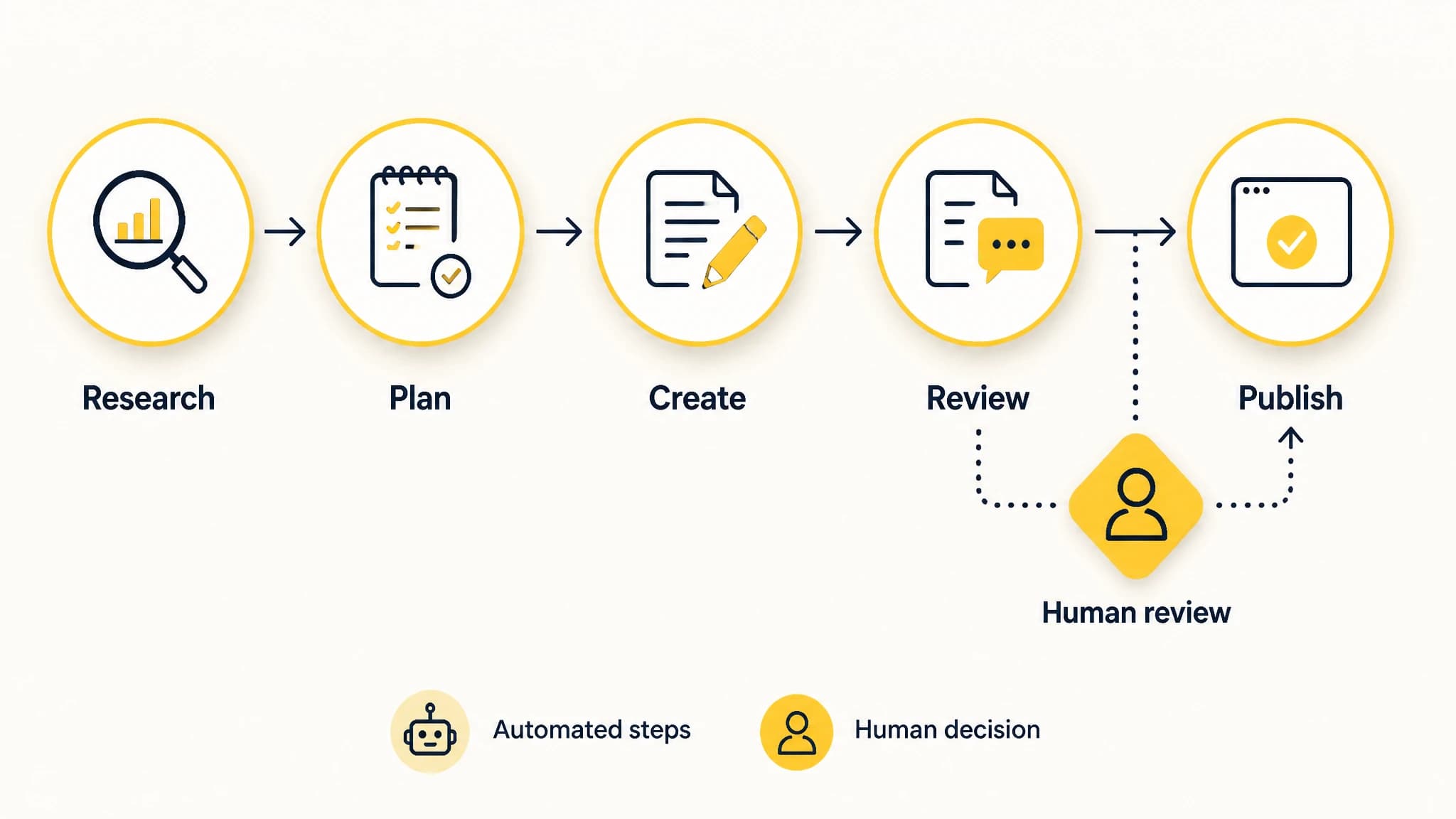
Connect repeatable production tasks while keeping editorial review visible.
If you are evaluating automation, focus on the work that repeatedly consumes attention rather than assuming every task should be automated. Our guide to SEO automation software can help you assess which parts of the process to standardize and which still depend on team judgment.
Protect quality with explicit review gates
Increasing output creates more opportunities for small problems to pass unnoticed. Make quality a defined part of the process, rather than an informal final glance when someone has time.
Use review gates that match the article’s risk and purpose:
- Before drafting: Is the topic relevant, and is the intended reader clear?
- During review: Are factual claims checked, explanations useful, and recommendations appropriately qualified?
- Before publishing: Is the article complete, readable, correctly formatted, and accurate to your brand?
- After publishing: Does the live page display properly, and does it need follow-up or future updating?
Assign an owner to each decision. A writer can improve clarity, but a subject-matter expert may need to verify technical claims. An editor can check structure and usefulness, while the person responsible for the site confirms publishing details. Avoid asking every reviewer to approve everything: unclear ownership can add delay without adding much protection.
Make feedback actionable. Instead of asking for a general “quality check,” specify what the reviewer should verify. When a recurring issue appears, update the brief or checklist so the team is less likely to repeat it on the next article.

Make quality checks specific so reviewers know what to verify.
Plan workload as a pipeline
A sustainable content operation plans more than publication dates. It keeps a balanced number of articles moving through each stage and makes ownership visible. Use one shared view with, at minimum, the topic, intent, owner, status, next action, reviewer, and target publication window.
Review the plan regularly. Ask which items are blocked, which need a decision, and whether the next set of topics matches the team’s available expertise. If several articles are waiting on the same reviewer, adjust the workload or make the review request more focused. If drafts are ready but not scheduled, address the publishing handoff rather than commissioning more drafts.
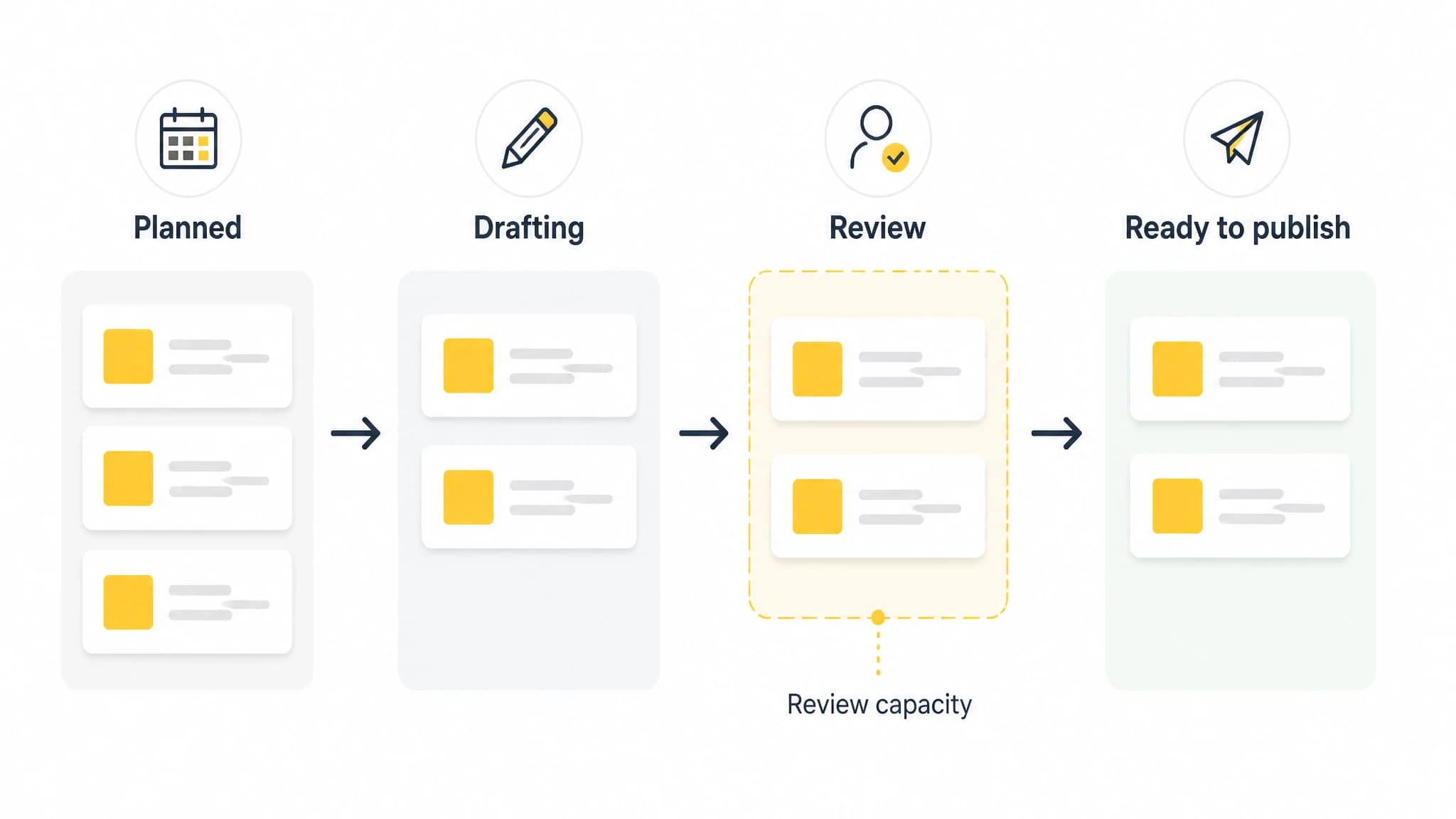
Balance work across stages and make review capacity visible.
A practical operating rhythm might include a short weekly review of blocked work and a less frequent review of topic priorities and capacity. Keep the cadence proportional to your team; the purpose is to make decisions and remove obstacles, not create meetings for their own sake.
For a team weighing whether to adopt automation, the main objection is often that automation will make content generic or create more cleanup. That can happen when tools are used without clear standards or human checks. Start with a small, representative set of topics, define the review gates, and examine the work returned at each stage. Expand only when the process is producing material your team can review confidently.
When RankWorker is a good fit
RankWorker is a practical fit for founders and teams that have a defined SEO content goal but are losing capacity to repeated research, planning, drafting, image, metadata, scheduling, or publishing tasks. We connect supported steps in a repeatable content process, giving teams a way to reduce manual coordination while keeping editorial ownership in place.
It is not a substitute for deciding what your business should say, confirming specialist claims, or reviewing whether an article is genuinely useful. If your main bottleneck is a lack of subject expertise or an unclear content strategy, resolve those decisions first. If the strategy is clear and the team is repeatedly doing the same operational work by hand, trying a structured workflow is a sensible next step.
A practical way to begin
To scale SEO content production without expanding your team, begin with one month of current-state observation. Find the stage where work waits, estimate the human review capacity available, and choose a publishing cadence that fits the work’s complexity. Standardize the handoffs and define the checks that protect accuracy and usefulness.
Then automate a limited set of repeatable tasks and measure whether work moves through the process with fewer avoidable interruptions or returns. Keep the editorial decisions with people, and change the process when the evidence shows a bottleneck has moved. That is how a team can increase useful output without confusing more activity with better content operations.