

 Veselin Stoyanov13 min read
Content Publishing APIs: How to Automate Article Delivery to Your Website
Learn how to use a content publishing API to deliver articles, metadata, images, and schedules to your website with validation, approvals, and reliable failure handling.

A content publishing API connects the system where content is created with the website or CMS where that content is published. Instead of manually copying article text, images, metadata, and publication settings, your systems exchange structured information through an agreed interface.
That can make publishing faster and more consistent, but an API alone does not create a reliable workflow. You also need validation, authentication, scheduling rules, approval states, retry handling, and clear monitoring.
This guide explains when API-based publishing makes sense, compares direct API publishing with webhook-driven delivery, and provides a practical workflow for sending SEO content to your website without losing editorial control.
When does an API-based publishing workflow make sense?
An API-based workflow is useful when publishing involves repeated steps, multiple systems, or a growing content operation. Common signals include:
- Your team copies the same content fields between tools.
- Articles need consistent SEO metadata, images, categories, or authors.
- Content is produced in one system but published through another.
- You manage more than one website or content channel.
- You want scheduled delivery without logging into the CMS for every article.
- You need a repeatable review and approval process.
An API may be unnecessary for a small site that publishes occasionally and has a simple CMS workflow. Manual publishing can be easier to inspect when volume is low and every article is substantially different.
The strongest case for automation appears when repetition creates risk. Manual copying can introduce missing metadata, incorrect slugs, duplicate content, wrong publication dates, or images uploaded to the wrong article. A structured delivery process reduces those errors by making the required fields explicit.
With RankWorker, we support content planning, article generation, SEO metadata, images, scheduling, and delivery through our Direct API and webhooks. The right option depends on whether your system wants to request content directly or react when content becomes available.
Direct publishing API vs. webhook automation
Direct publishing and webhooks solve related problems, but they use different control patterns.
Direct publishing API
With a direct API workflow, your application sends a request to create or publish content. Your system controls when the request happens and can usually decide which article, status, category, or publication date to send.
A typical sequence looks like this:
- Your system identifies an approved article.
- It builds a structured request with content and metadata.
- It authenticates with the destination API.
- The website validates and stores the article.
- Your system records the response and publication status.
Direct publishing is a good fit when your CMS or orchestration layer is the source of truth for release timing. It also works well when you need a batch process, such as publishing several approved articles during a scheduled deployment window.
The trade-off is that your application must actively manage the process. It needs to know when content is ready, handle authentication, interpret responses, and retry failed requests safely.
Webhook-driven delivery
With webhook automation, a content system sends an event to your endpoint when a relevant action occurs. For example, an article may become approved, scheduled, or ready for delivery. Your endpoint receives the event and starts the next step in the workflow.
A webhook sequence often looks like this:
- An article reaches a defined state.
- The content system sends an event to your endpoint.
- Your endpoint verifies the request.
- A worker retrieves or transforms the content.
- The worker sends the content to your CMS.
- The workflow records success or schedules a retry.
Webhooks are useful when you want event-driven automation instead of repeatedly checking for changes. They can reduce unnecessary polling and make the handoff between systems more immediate.
The trade-off is operational complexity. Your endpoint must be available, secure, idempotent, and able to respond quickly even if downstream publishing takes longer.
For a deeper look at the event model, endpoint design, and delivery process, see our guide to webhook automation for SEO.
What should a content publishing payload include?
A reliable publishing API should use a clear content model. The exact fields depend on your CMS, but most SEO publishing workflows need more than a body of article text.
Core article fields
Include the information required to identify and display the article:
- External content ID
- Title
- Slug
- Body content
- Excerpt or summary
- Author or author reference
- Content type
- Publication status
- Canonical URL, if your system manages it
The external content ID is particularly important. It lets you match a delivery request to an existing article and helps prevent duplicate publishing when a request is retried.
SEO metadata
SEO fields should be transferred as structured values rather than embedded manually in the article body. Depending on your setup, these may include:
- Meta title
- Meta description
- Canonical URL
- Robots directives
- Open Graph title and description
- Social image reference
- Primary category or topic
Keep editorial content and metadata separate. That makes it easier for your website to map the fields into page templates and allows your team to validate them independently.
Media and image references
If the article includes images, define whether the payload contains a remote URL, a media ID, a file upload, or a reference that the receiving system must resolve. Also decide who owns image storage and what happens if an image is unavailable.
Do not let an article publish successfully while silently dropping required images. Either treat the missing asset as a validation failure or publish with an explicit fallback state that a person can review.
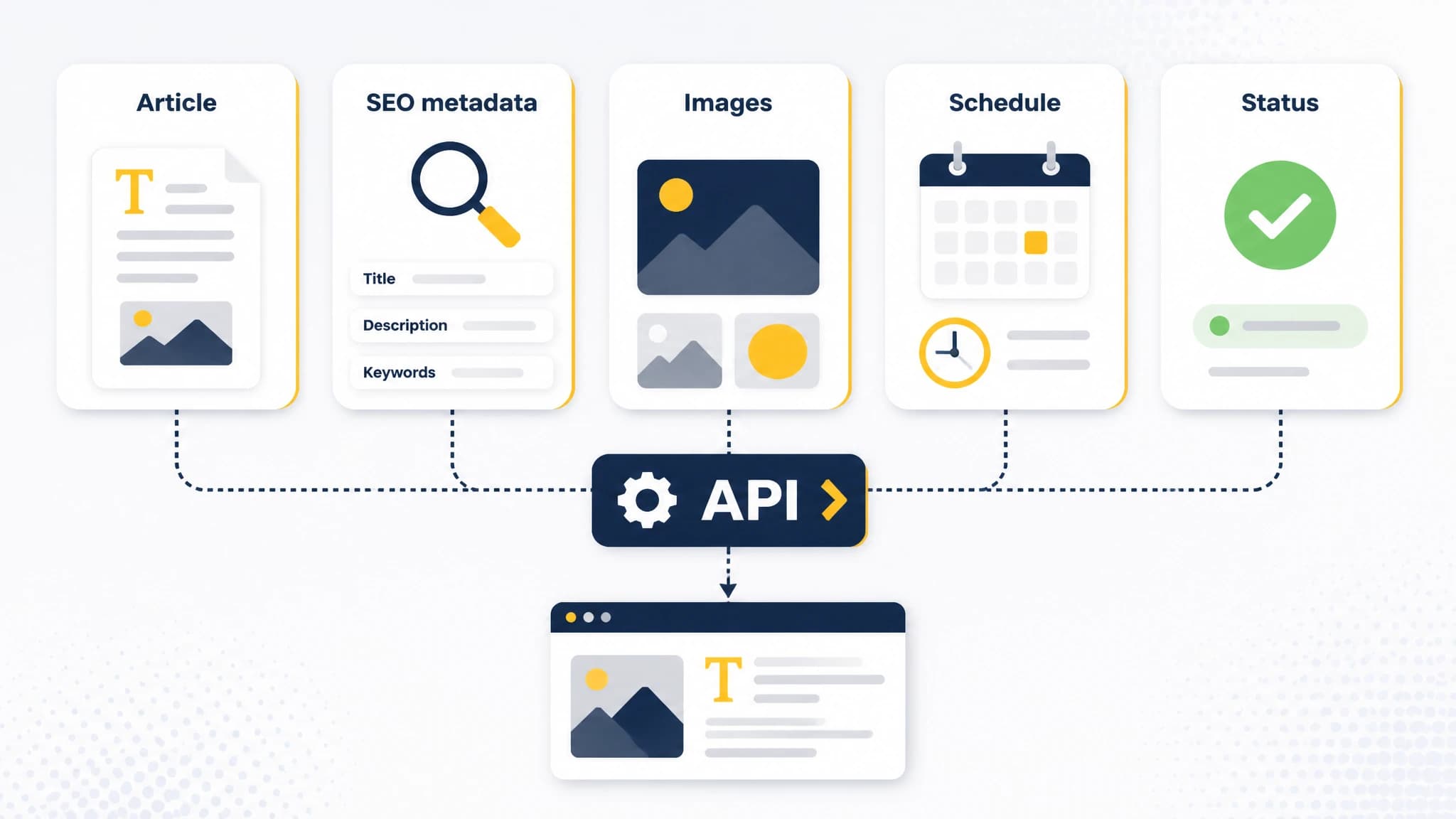
A reliable publishing payload carries content, metadata, media references, timing, and status.
Scheduling information
A scheduling payload should distinguish between the intended publication time and the time the request was delivered. Include a timezone or use a documented standard such as UTC. Ambiguous timestamps can cause articles to publish too early, too late, or on the wrong calendar day.
Also define whether the destination should:
- Publish immediately
- Save as a draft
- Schedule for a future time
- Update an existing article
- Unpublish or archive content
These states should be explicit. A missing status should not accidentally default to public publication.
Validate before sending content to your website
Validation is the control that turns a content publishing API from a simple transport mechanism into a dependable workflow.
Start with schema validation. Check that required fields exist, data types are correct, strings are within acceptable limits, and status values match the set supported by the receiving system.
Then add content-specific checks, such as:
- The title is not empty.
- The slug contains acceptable characters.
- The body is present and uses an expected format.
- The meta description is available when required.
- The publication date includes a timezone.
- All referenced images resolve correctly.
- The article is approved for the requested status.
- The destination identifier is valid.
Validation should happen before the request reaches the CMS whenever possible. Early failures are easier to diagnose than a generic error returned after partial processing.
You should also validate business rules. For example, an article may be technically valid but still not eligible for publication because it lacks an assigned reviewer, belongs to a restricted category, or has a future date outside the permitted scheduling window.
Add human approval without losing automation
Automation does not require every article to publish without review. A better design separates production from release.
One practical state model is:
- Planned
- Draft generated
- In review
- Approved
- Scheduled
- Published
- Failed or needs attention
Only the approved or scheduled states should be eligible for delivery. This creates a clear boundary between generating content and making it public.
Human approval is especially valuable when content touches regulated topics, brand-sensitive claims, customer promises, legal requirements, or rapidly changing information. Reviewers can check factual accuracy, tone, links, images, and whether the article is appropriate for the intended audience.
The approval event can trigger a webhook, or your publishing service can query for approved content on a schedule. In either case, make the state transition visible and record who approved the article and when.
Our workflow supports planning, content creation, SEO metadata, scheduling, and publishing steps so you can decide where review belongs before delivery. For a broader view of the systems involved, read our guide to content management APIs.
Design for failures and retries
Every publishing workflow will encounter failures. The goal is not to assume delivery always works. The goal is to make failures safe, visible, and recoverable.
Use idempotency
An idempotent request produces the same intended result when repeated. This matters when a timeout occurs after the CMS has already stored the article. Without an idempotency key or stable external ID, a retry may create a duplicate post.
Your destination should be able to distinguish between:
- A new article
- An update to an existing article
- A duplicate delivery attempt
- A request for an unknown article
Classify errors
Separate temporary failures from permanent failures. A network timeout, rate limit, or temporary server error may justify a retry. An invalid slug, missing required field, or failed authorization usually requires a correction before trying again.
Use bounded retries with increasing delays. Avoid sending requests continuously when the destination is unavailable, because that can increase load and make recovery harder.
Keep an audit trail
Record the request ID, article ID, destination, timestamp, response status, error message, retry count, and final outcome. For webhook workflows, also record the event ID and whether it has already been processed.
A useful dashboard does not need to be complicated. It should answer three questions quickly:
- What is waiting to be delivered?
- What failed and why?
- What was published successfully?
A practical implementation pattern
A small publishing service can make the workflow easier to maintain than placing all logic inside a CMS plugin or a single automation script.
The service can contain five parts:
- Receiver - accepts direct requests or webhook events.
- Verifier - checks authentication, signatures, timestamps, and event IDs.
- Validator - checks the content schema and business rules.
- Publisher - maps the approved payload to the destination CMS API.
- Recorder - stores statuses, errors, retries, and publication identifiers.
Keep the receiver fast. If publishing may take more than a short time, acknowledge the event and process it through a queue or background worker. This reduces the chance that the sender treats a slow response as a failed delivery.
Use environment-managed secrets rather than placing credentials in article payloads or source code. Limit each credential to the permissions needed for its job, and rotate credentials according to your security process.
If you are connecting several systems, document the contract between them. Write down field names, allowed values, authentication expectations, response formats, retry behavior, and ownership for each failure type.
How to choose the right approach
Choose direct API publishing when:
- Your application controls the release schedule.
- You need batch or on-demand publishing.
- The destination has a stable content management API.
- Your team can operate retries and monitoring.
Choose webhook automation when:
- Publishing should begin after a state change.
- You want event-driven delivery.
- Your system can expose a secure endpoint.
- You want to avoid frequent polling.
Use a hybrid approach when your workflow needs both. For example, a webhook can notify your service that an article is approved, while a direct API request performs the final delivery to the CMS.
The important decision is not simply direct API versus webhook. It is whether your workflow has clear ownership, validation, approval, delivery, and recovery steps.
Content publishing API checklist
Before automating article delivery, confirm that you have:
- A defined content schema
- Stable article and delivery identifiers
- Authentication and permission rules
- Validation before publication
- Explicit draft, scheduled, and published states
- Timezone handling
- Image and metadata mapping
- Idempotency protection
- Retry rules
- Error classification
- Approval requirements
- Delivery logs and alerts
- A process for correcting failed articles
Start with one content type and one destination. Test drafts before public posts, simulate timeouts and duplicate events, and confirm that a retry does not create a second article. Expand only after the basic workflow is observable and recoverable.
A content publishing API is most valuable when it removes repetitive work without hiding important decisions. When the workflow is structured, your team can publish more consistently while keeping approval and quality controls in place.
With RankWorker, we help connect SEO planning and content production to repeatable publishing workflows. Use our Direct API when your application should control delivery, or use our webhooks when your system should react to content events. Start with the smallest useful workflow, measure its failure points, and improve from there.