

 Veselin Stoyanov12 min read
WordPress Editorial Workflow: A Practical System for SEO Content Teams
Build a practical WordPress editorial workflow for briefs, drafting, review, SEO optimization, approval, scheduling, and publishing.

A strong WordPress editorial workflow gives every SEO article a clear path from idea to publication. Instead of relying on scattered documents, chat messages, and last-minute WordPress edits, your team can define who does what, which checks happen at each stage, and when an article is ready to go live.
The goal is not to remove human judgment. It is to make the repeatable parts of content production easier to manage so editors can focus on accuracy, usefulness, originality, and brand quality.
This guide covers a practical WordPress content workflow for teams that need to manage briefs, assignments, drafting, review, SEO optimization, approval, scheduling, and publication.
What a WordPress editorial workflow should control
A complete workflow should answer six questions for every article:
- What is the article about? The brief should define the search intent, primary keyword, audience, angle, and expected outcome.
- Who owns each step? Assign responsibility for research, writing, editing, SEO checks, approval, and publication.
- What standard must the article meet? Create checks for factual accuracy, structure, brand voice, links, metadata, and formatting.
- What happens when changes are needed? Review comments should lead to clear revisions rather than unclear back-and-forth.
- Who gives final approval? A named approver prevents uncertainty before publication.
- How is the article published and maintained? Scheduling, indexing, performance review, and future updates should be part of the process.
Without these controls, a WordPress workflow often becomes a sequence of loosely connected tasks. Articles may be written before the topic is properly validated, approved content may be edited again during upload, or important SEO fields may be missed at the final stage.
Step 1: Create a structured content brief
The brief is the foundation of the workflow. A useful brief gives the writer enough direction to produce a relevant article without turning the process into a rigid script.
Include these fields:
- Topic and primary keyword: State the main search target in plain language.
- Search intent: Identify whether the reader wants an explanation, comparison, tutorial, checklist, or product solution.
- Audience: Describe the reader’s experience level, business context, and likely problem.
- Secondary keywords: Include closely related terms that support the topic naturally.
- Article angle: Explain what the article should help the reader decide or accomplish.
- Suggested structure: Provide the major sections, questions to answer, and examples to include.
- Internal linking opportunities: Identify relevant pages that help readers continue learning.
- Conversion goal: Define the useful next step, such as starting a trial, reading a related guide, or requesting more information.
- Publishing requirements: Record the category, tags, author, featured image, metadata, and planned date.
A brief should also include boundaries. If the article must avoid unsupported claims, competitors, certain topics, or unverified statistics, write those limitations down before drafting begins.
For larger teams, use one standard brief template. Consistent inputs make assignments easier, improve handoffs, and help editors compare articles against the same expectations.
Step 2: Assign ownership and status
A WordPress editorial workflow needs visible ownership. The exact roles may vary, but each article should have one person responsible for moving it forward.
A simple assignment model includes:
- Content strategist: Selects the topic and confirms its role in the broader content plan.
- Writer or content generator: Produces the draft from the approved brief.
- Subject matter reviewer: Checks accuracy, practical usefulness, and technical detail.
- SEO editor: Reviews keyword alignment, headings, links, metadata, and search intent.
- Managing editor: Resolves conflicts and gives final editorial approval.
- Publisher: Confirms formatting, scheduling, and WordPress publication settings.
One person can hold several roles on a small team. The important point is that the responsibilities are explicit.
Use a small set of workflow statuses, such as:
- Idea
- Brief ready
- Assigned
- Drafting
- Editorial review
- SEO review
- Revision required
- Approved
- Scheduled
- Published
- Refresh planned
Avoid creating a different status for every minor action. Statuses should show where an article is in the process and what needs to happen next.
Step 3: Draft against the brief
During drafting, the writer should solve the reader’s problem rather than simply place keywords in headings. The article should answer the primary query early, use clear sections, and support recommendations with practical reasoning.
A useful drafting checklist includes:
- Answer the main question in the introduction.
- Use the primary keyword naturally in the title, introduction, and relevant headings.
- Cover the important subtopics implied by search intent.
- Use short paragraphs and descriptive headings.
- Include steps, examples, tables, or checklists when they improve comprehension.
- Explain trade-offs instead of presenting every recommendation as universally correct.
- Add internal links only where they help the reader.
- Separate verified facts from assumptions or suggestions.
- End with a useful next step.
For AI-assisted production, the brief and review process become even more important. Automation can accelerate research, outlining, drafting, metadata, and formatting, but it should not replace editorial accountability.
With RankWorker, we can support the production stages that commonly create repetitive work, including keyword planning, content opportunities, clustering, content planning, article generation, images, SEO metadata, scheduling, and publishing. Your team can still define the brief, review the output, and control approval before publication.
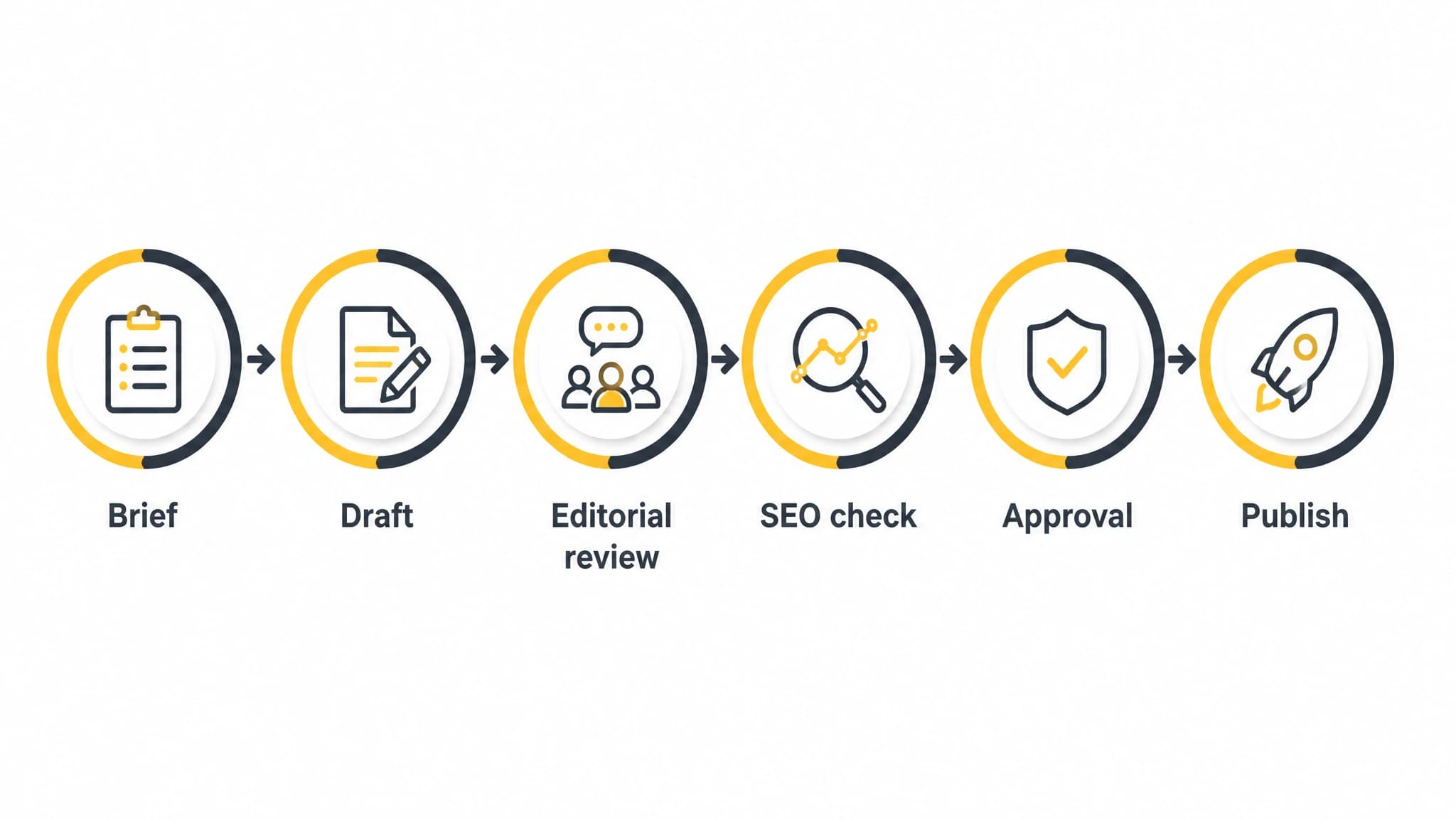
Define each stage so every article has a clear owner and next action.
Step 4: Run editorial review before SEO review
Editorial review should come before the final SEO pass. If the article has a weak argument, inaccurate explanation, or unclear structure, optimizing its metadata will not solve the underlying problem.
Ask the reviewer to check:
Accuracy and trust
Are the claims supported by the available information? Does the article distinguish facts from opinions? Are product capabilities, examples, and recommendations stated precisely?
Search intent
Does the article address what the reader is actually trying to accomplish? A guide for beginners should not assume advanced knowledge, and a comparison should not avoid the decision criteria readers need.
Original value
Does the article add a useful framework, process, example, or point of view? Content that merely repeats common advice is less useful than content that helps readers act.
Readability
Can a busy reader scan the article and understand the main points? Look for unnecessary repetition, vague wording, oversized paragraphs, and headings that do not describe the section clearly.
Brand alignment
Does the article use the correct tone and terminology? Product mentions should connect to a real reader problem rather than appear as unrelated promotions.
A practical review comment should identify the issue, explain why it matters, and suggest the required change. For example, “Add the approval owner before the scheduling step so the process does not imply that every draft can be published automatically” is more useful than “This section needs work.”
For more guidance on protecting accuracy, originality, brand voice, and search performance during AI-assisted production, see our content approval workflow guide.
Step 5: Complete the SEO and WordPress checks
After the article passes editorial review, complete the optimization and publishing checks. These should be handled as a defined stage, not as a rushed task immediately before publishing.
On-page SEO checks
Confirm that the article has:
- A clear title focused on the primary search intent.
- A readable URL slug.
- A useful meta title and meta description.
- A logical H1, H2, and H3 hierarchy.
- Natural use of the primary and secondary keywords.
- Relevant internal links.
- Descriptive image alt text.
- A clear conclusion and next step.
WordPress formatting checks
Confirm that:
- Headings use WordPress heading styles rather than manually enlarged text.
- Lists, tables, quotes, and code blocks render correctly.
- Links point to the intended destinations.
- Images are compressed and placed in the correct sections.
- The featured image is set.
- The author, category, and tags are correct.
- Any required custom fields or SEO plugin fields are complete.
Accessibility checks
Use descriptive link text, meaningful alt text, sufficient heading structure, and readable formatting. Accessibility is not a separate decoration step. It is part of publishing content that more people can understand and use.
Step 6: Approve the final version
Approval should happen after all requested changes are complete. The approver should review the actual version that will be scheduled, not an earlier document that may differ from the WordPress draft.
A final approval checklist can be short:
- The article matches the approved brief.
- Required revisions are complete.
- Claims and product references are accurate.
- SEO fields are present.
- Links and images have been checked.
- The publishing date and author are correct.
- No unresolved comments remain.
If approval is rejected, return the article to a clearly defined revision status. Do not leave it marked as approved while changes are still pending.
A good content approval workflow separates “ready for review” from “approved.” That distinction makes responsibility clear and prevents accidental publication.
Step 7: Schedule and publish consistently
Scheduling turns content production into a calendar instead of a series of isolated publishing decisions. Once an article is approved, confirm the date, time zone, author, category, and final WordPress status.
For recurring SEO content, define a realistic publishing cadence. Consistency matters, but increasing volume should not weaken topic selection, review quality, or site maintenance.
Our WordPress publishing workflow can reduce repetitive manual steps by connecting planned content with article production, SEO metadata, images, scheduling, and publication. That is useful when the same sequence must be repeated across many articles or sites while approval controls remain with the team.
For a deeper look at calendar management, read our guide to WordPress post scheduling.

A final publishing checklist catches avoidable errors before an article goes live.
Step 8: Review performance and plan refreshes
Publication is not the end of the workflow. Add a maintenance stage so your team can review whether each article still matches the reader’s needs and business goals.
Depending on your site and reporting setup, review:
- Organic impressions and clicks.
- Ranking changes for the target topic.
- Engagement and conversion activity.
- Pages that receive or send internal links.
- Outdated claims, screenshots, examples, or recommendations.
- Articles that overlap with newer content.
A refresh may involve improving the introduction, expanding an incomplete section, replacing outdated information, clarifying the search intent, or merging overlapping pages. Do not update the date without making meaningful changes.
Create a refresh status and assign an owner. This keeps maintenance visible instead of relying on someone to remember which articles need attention.
A practical workflow template
You can implement the process with this sequence:
- Select a topic based on audience need and search intent.
- Complete and approve the content brief.
- Assign the article and set a due date.
- Draft the article and prepare initial metadata.
- Run editorial review for accuracy, usefulness, originality, and voice.
- Make revisions and resolve comments.
- Run SEO and WordPress formatting checks.
- Approve the final version.
- Add images, metadata, category, tags, and publishing settings.
- Schedule or publish the article.
- Monitor performance and add a future refresh date.
Teams using multiple WordPress sites can adapt the same framework by adding site-specific fields for audience, voice, access, categories, and publishing rules. Our guide to managing multiple WordPress sites covers the operational challenges that appear as the number of sites grows.
How to improve the workflow over time
Start with the smallest process that protects quality. Then improve it using evidence from real production problems.
If articles are often delayed, inspect assignment and approval bottlenecks. If quality varies, strengthen the brief and review checklist. If publishers repeatedly fix the same formatting issues, add those checks earlier or automate the repetitive preparation work.
Track a few practical measures:
- Time from approved brief to draft.
- Time spent in review.
- Number of revision cycles.
- Articles published on schedule.
- Common reasons for rejection.
- Articles needing significant post-publication corrections.
The objective is not to make every article identical. It is to create a dependable path that gives people enough control while reducing avoidable manual work.
Conclusion
A practical WordPress editorial workflow connects strategy, production, review, optimization, approval, scheduling, publication, and maintenance. The strongest systems make ownership visible, define quality checks, and separate automation from final editorial judgment.
If your team is spending too much time moving content between documents, spreadsheets, and WordPress, automate the repetitive parts first. Keep briefs, review standards, approval ownership, and publishing checks clear. With RankWorker, you can build a connected SEO content workflow that supports consistent WordPress publishing without treating quality control as an afterthought.