

 Veselin Stoyanov11 min read
Blog Content Planning Template for SEO: Map Topics, Intent, and Target Pages
Use this SEO content planning template to map topics, search intent, audiences, target pages, priorities, and next actions into a practical monthly plan.

Planning blog content for SEO means choosing topics based on what your audience needs, matching each topic to its likely search intent, and deciding what page should answer it. A useful plan is more than a list of keywords: it gives every idea a target page, a reason to publish, a priority, and a next action.
Use the template below as a working document for your next month of content. You can build it in a spreadsheet, a project board, or another planning tool. The format matters less than keeping the decisions connected and easy to revisit.
The SEO blog content planning template
Create one row for each topic or page you are considering. Keep the fields focused enough that you can fill them in without turning planning into a research project of its own.
| Field | What to record | Example |
|---|---|---|
| Topic | The subject the page will cover | Choosing a project management tool for a small agency |
| Primary query | The main search phrase or query pattern | project management software for small agencies |
| Search intent | What the searcher is trying to do | Compare options before choosing a tool |
| Audience need | The question or problem behind the search | Find a tool that fits a small team without unnecessary complexity |
| Target page | The page that should satisfy the need | A comparison guide on the blog |
| Page decision | Create, update, consolidate, or skip | Create, if no suitable page exists |
| Priority | Why this belongs in the plan now | Relevant to the audience and a clear product-education opportunity |
| Next action | The immediate step that moves it forward | Review existing search results and prepare an outline |
| Planned date | A realistic target date for the next milestone | Week 2, Thursday |
| Status | Where the work stands | Research needed |
The example is illustrative, not a claim about search volume or expected performance. Replace it with a topic that fits your own audience and business. If you cannot explain the audience need or the purpose of the target page, leave the idea in research rather than scheduling it as a finished assignment.
How to fill in each field
1. Start with a topic and a query pattern
A topic describes the subject; a query pattern represents how people might search for it. You do not need to force every article into one exact phrase. Record the primary query you are investigating, then note close variations or related questions separately if they change what the page needs to cover.
Use your own customer conversations, support questions, site search, and keyword research to generate candidates. A keyword is a starting point, not proof that a separate article is needed. When several queries appear to ask for the same answer, consider whether one thorough page can serve them together.
2. Identify intent and audience need
Write intent as a plain-language task, such as learning how a process works, comparing approaches, finding a specific resource, or evaluating a purchase. Then describe the audience need in a sentence that a real reader might recognize.
This distinction helps keep the plan useful. “Informational” is a label; “learn how to compare project management tools before choosing one” is a decision you can use to shape the page. If the likely intent is mixed or uncertain, make that uncertainty a research task rather than pretending the answer is settled.
3. Choose the target page before adding a date
For each topic, decide whether the right action is to create a new article, improve an existing page, combine overlapping pages, or skip the idea. Search your own site before assigning a new URL. A new article can create unnecessary overlap if a current page already answers the same need.
The target page should be specific enough to guide the work. “Blog” is not a target page. “A practical guide comparing project management options for small agencies” is. For a broader view of how topics and publishing decisions fit together, see our SEO content planning guide.
4. Prioritize with a written reason
You do not need a complicated scoring formula to make a useful plan. Choose a small set of criteria that reflect your actual constraints, such as audience relevance, business fit, evidence of demand, existing coverage, and effort. Record a short reason for the decision so a teammate or your future self can understand it later.
Do not treat priority as a promise of ranking or traffic. It is a way to decide what deserves attention first given what you know now. If an important input is missing, make the next action “validate the opportunity” instead of assigning an arbitrary score.
5. Make the next action small and clear
A plan becomes actionable when every active row has a next step. “Write article” may be too broad if the topic still needs validation. More useful next actions include checking existing pages, reviewing search intent, grouping related queries, drafting an outline, or assigning a realistic publishing date.
If the topic is ready, date the next meaningful milestone, not just the hoped-for publication day. That gives the plan room for research, drafting, review, and publishing without pretending every article takes the same amount of time.
A filled example, from opportunity to planned page
Suppose a small agency has heard prospects ask how to choose project management software. The team finds several related queries during keyword research. Before planning multiple posts, it checks whether those queries call for different answers or belong on one comparison guide.
| Topic | Intent | Audience need | Target page | Priority reason | Next action | Planned milestone |
|---|---|---|---|---|---|---|
| Project management software for small agencies | Compare options | Choose a tool that suits a small team and its workflow | New comparison guide, if no suitable page exists | Relevant to the intended audience; the query suggests a decision in progress | Review current coverage and search results, then outline evaluation criteria | Week 2: outline review |
| How to organize client work in a project board | Learn a process | Set up a repeatable way to track client tasks | Existing workflow article, if it already answers this need | Could support the comparison guide, but first check for overlap | Audit existing articles and note missing steps | Week 3: update decision |
| Project management checklist for onboarding a client | Find a practical resource | Avoid missing steps when a new client starts | New checklist page, if the audience need is distinct | Clear resource format; validate that it fits the site and audience | Confirm the checklist is distinct from existing onboarding content | Week 4: validate topic |
This example shows why the target page and next action matter as much as the topic. The first idea may become a new page. The second may be an update instead of another post. The third stays in validation until the team confirms it is distinct and useful.
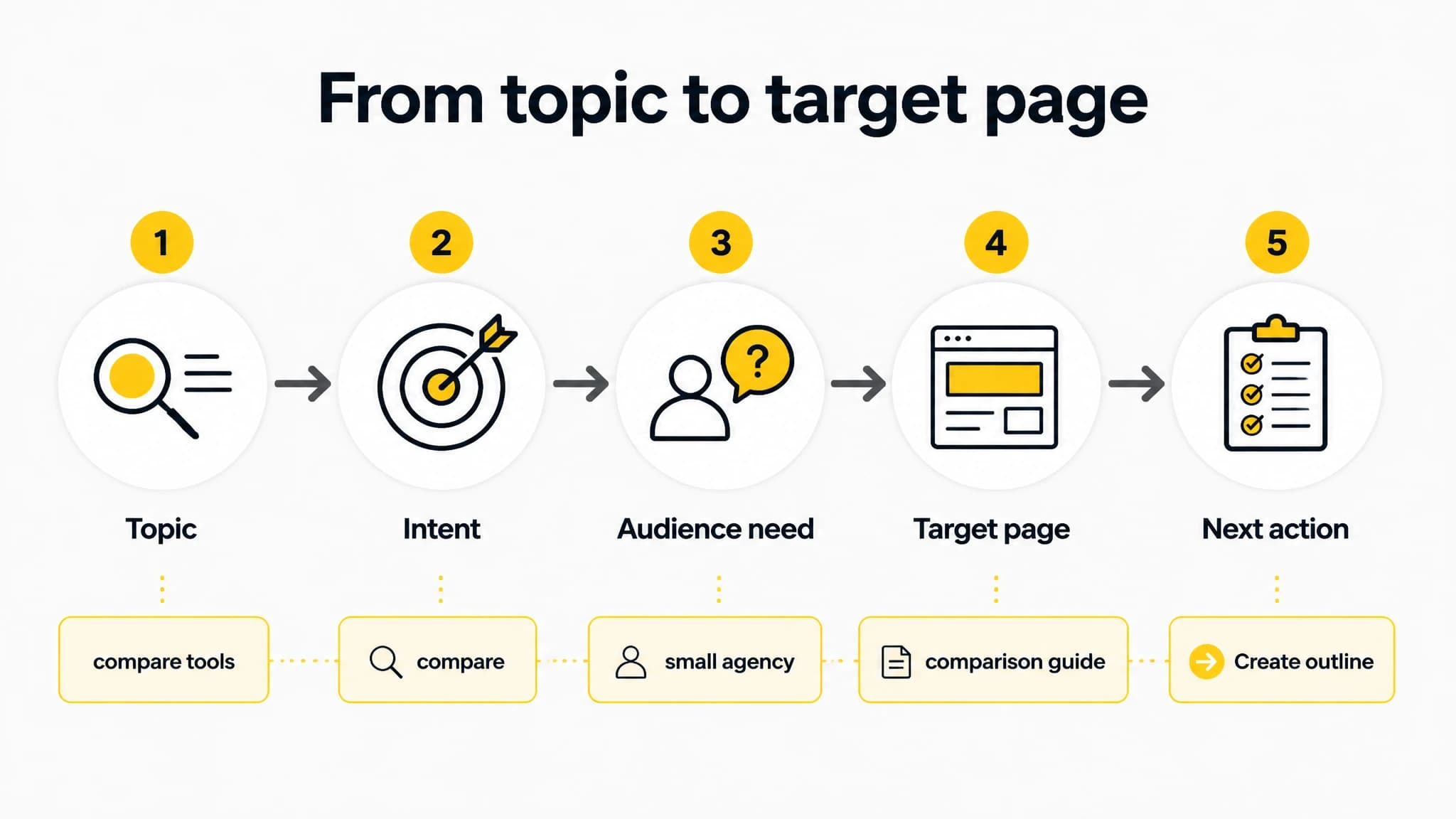
Map each topic to the need it serves and the page that should answer it.
Connect opportunities and clusters to a dated plan
Once you have candidate topics, group related opportunities by the problem they solve. A cluster can help you spot ideas that belong together, but it should not automatically become a set of separate articles. Review the intent and target page for each candidate, then decide whether it needs its own page or can be covered as part of a stronger, more complete one.
A simple sequence is:
- Research: Collect relevant queries and audience questions.
- Group: Cluster related opportunities by shared need and likely page purpose.
- Decide: Choose create, update, consolidate, or skip for each topic.
- Prioritize: Record why each selected page belongs in the plan now.
- Schedule: Assign realistic milestones based on your available capacity.
- Review: Revisit the plan when research or business priorities change.
For a more detailed way to move from keyword opportunities into a prioritized schedule, use our SEO content roadmap framework. It can help you think through prioritization without making the template above more complicated than your team needs.
With RankWorker, we can connect keyword research and content opportunities to content clusters and planning, then use the resulting plan to guide article creation, metadata, scheduling, and publishing. For example, you can research a set of relevant queries, group related opportunities, decide which pages belong on the calendar, and move selected topics toward a dated article plan. The final choices still need to reflect your audience, site coverage, and capacity.
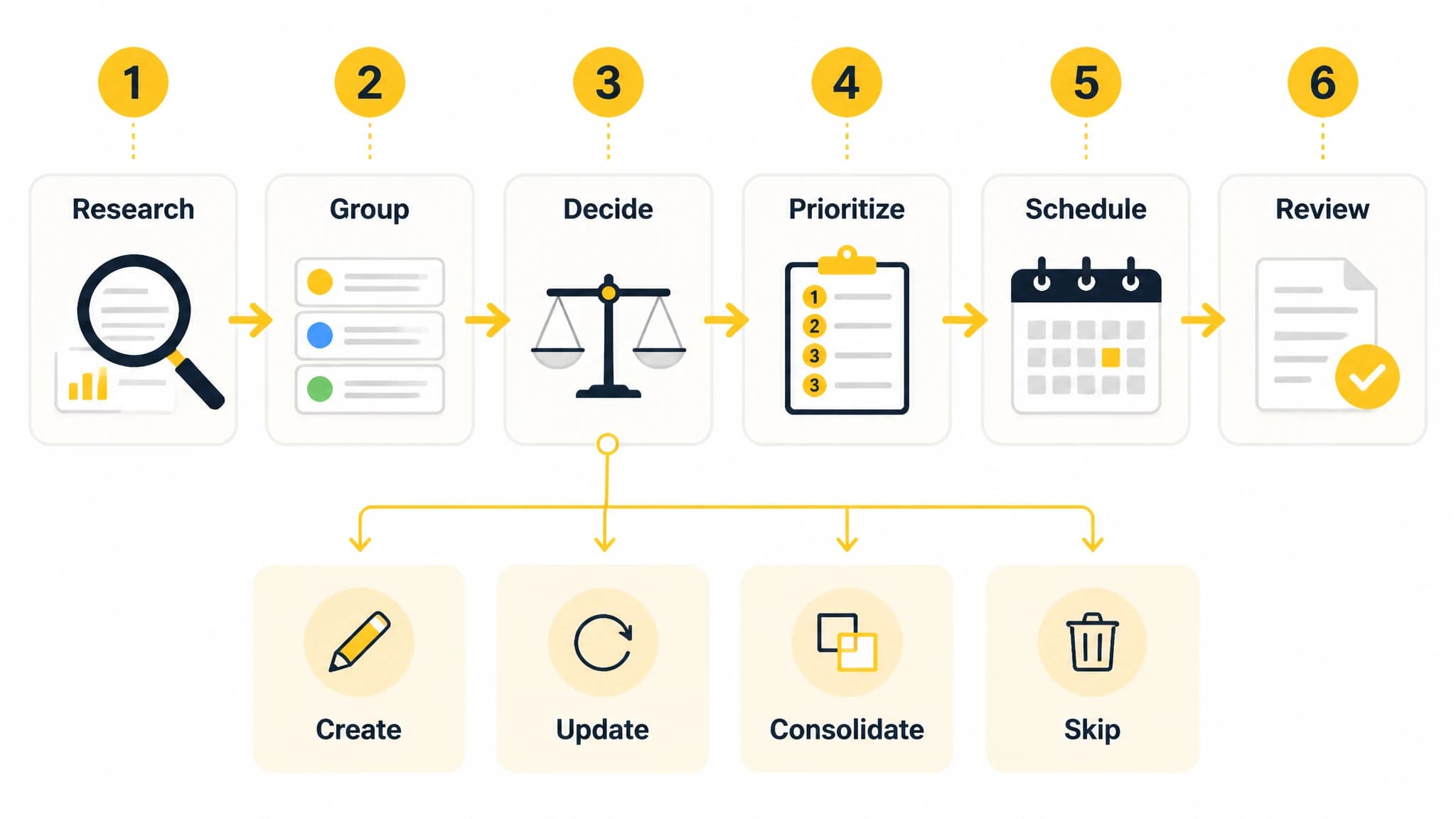
A repeatable sequence turns researched opportunities into a realistic publishing plan.
Keep the plan small enough to use
A content plan should help you make the next decision, not become a second job. If you are a solo founder or a small team, start with a month and a manageable number of topics. Leave space for research and review instead of filling every available date before you know how much work each article needs.
A spreadsheet can be enough when one person owns the workflow and the plan changes infrequently. A dedicated workflow may be more useful when keyword research, clustering, article creation, metadata, scheduling, and publishing need to stay connected. The trade-off is straightforward: a simple sheet is easy to adapt, while a connected process can reduce the manual handoffs between planning and execution. You do not need to change tools just to use this template.
If you are building a broader approach beyond this month’s article decisions, our SEO strategy guide covers the wider planning context. Keep this template focused on the decisions that get a specific topic to its next useful step.
To start today, choose three to five candidate topics, fill in the intent, audience need, target page, priority reason, and next action for each, then assign only the milestones you can realistically support. Review the rows before scheduling: remove duplicates, mark uncertain ideas for validation, and make sure each planned page has a distinct job.